GPT Image 2.0 Japanese Thumbnail
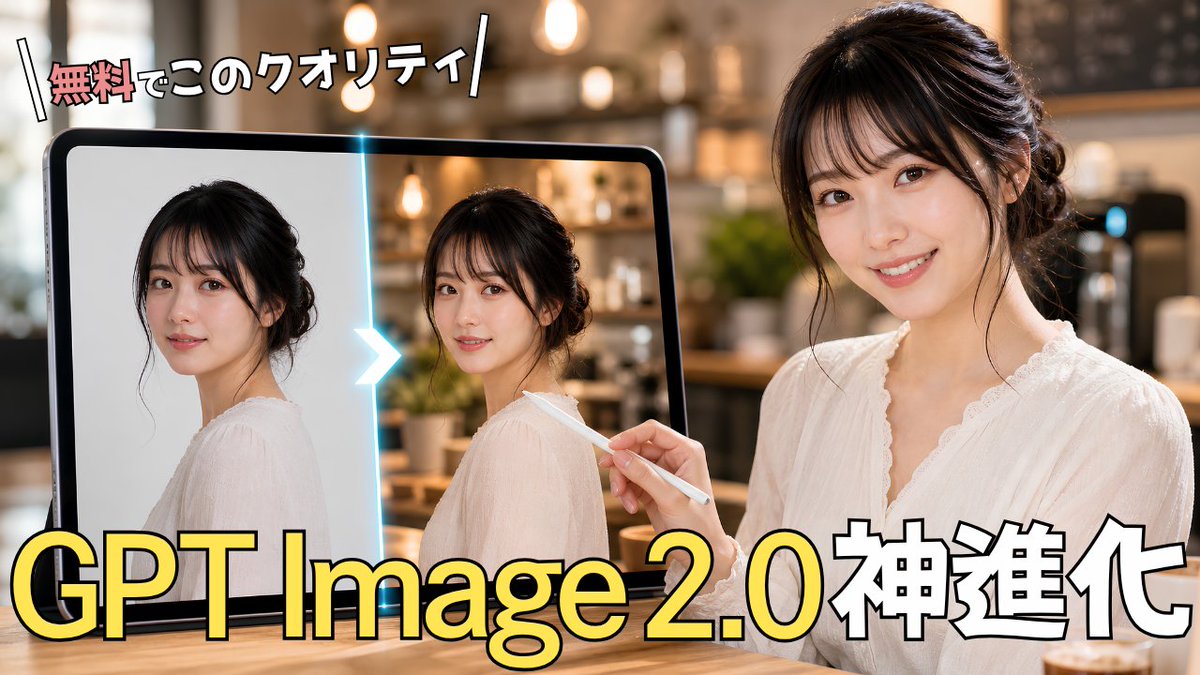
Generates a bold Japanese YouTube thumbnail showing a before-and-after AI photo enhancement scene for GPT Image 2.0 content.
프롬프트
AI 이미지 생성 개선에 관한 임팩트 있는 일본어 유튜브 썸네일을 제작하세요. 캔버스: 16:9 가로형 썸네일, 크리에이터 썸네일 특유의 굵은 타이포그래피가 적용된 사실적인 스타일. 장면: 펜던트 조명과 보케 효과가 있는 따뜻하고 부드럽게 흐려진 카페 내부, 앞쪽에는 나무 테이블. 오른쪽에는 흰색 레이스 블라우스를 입고 머리를 우아하게 올린 젊은 일본인 여성 1명이 왼쪽을 향해 앉아 있습니다. 익명성 보호를 위해 얼굴은 평평한 직사각형 베이지색 블러/모자이크 블록으로 가려져 있습니다. 그녀는 오른손에 흰색 스타일러스 펜을 들고 왼쪽의 대형 태블릿을 가리키고 있습니다. 왼쪽에는 검은색 테두리의 대형 태블릿 1대가 세워져 있습니다. 화면에는 동일한 여성의 인물 사진 2장이 나란히 배치되어 있으며, 각 사진의 얼굴 위에는 베이지색 직사각형 블러 처리가 되어 있습니다. 왼쪽 사진은 밝은 배경의 단순한 원본 이미지처럼 보이고, 오른쪽 사진은 더 사실적인 카페 조명과 디테일이 추가된 보정된 이미지처럼 보입니다. 태블릿 속 두 사진 사이에는 빛나는 청록색 수직 구분선을 배치하고, 왼쪽에서 오른쪽으로 향하는 밝은 흰색-파란색 꺾쇠 화살표를 넣어 보정 전후를 나타내세요. 텍스트: 왼쪽 상단에 {argument name="top headline text" default="無料でこのクオリティ"}라는 작고 활기찬 일본어 헤드라인을 배치하세요. 첫 단어는 빨간색/분홍색으로, 나머지 글자는 흰색에 굵은 검은색 테두리를 적용하고 약간 기울인 뒤 양옆에 대각선 슬래시 장식을 넣으세요. 하단에는 {argument name="main headline text" default="GPT Image 2.0神進化"}라는 문구를 아주 크고 굵은 글씨로 배치하세요. “GPT Image 2.0”은 검은색 테두리와 은은한 그림자가 있는 밝은 노란색으로, “神進化”는 검은색 테두리가 있는 흰색으로 만드세요. 텍스트 블록은 상단 헤드라인과 하단 헤드라인, 딱 2개만 유지하세요. 전체 스타일: 광택이 있고 전문적인 일본식 테크 튜토리얼 썸네일, 강한 대비, 따뜻한 영화적 조명, 얕은 피사계 심도, 깔끔한 구도, 로고나 워터마크 없음, 추가 텍스트 없음. 커스터마이징: 여성은 {argument name="subject description" default="a young Japanese woman with dark hair in a loose updo wearing a white lace blouse"}로, 배경은 {argument name="background setting" default="a cozy modern cafe with warm pendant lights"}로, 주제는 {argument name="topic" default="GPT Image 2.0 photo enhancement"}를 시각적으로 암시하도록 설정하세요.
기계 번역 — 실제 결과물을 만든 것은 원문 프롬프트입니다.
원문 프롬프트
Create a high-impact Japanese YouTube thumbnail about AI image generation improvement. Canvas: 16:9 horizontal thumbnail, photorealistic with bold creator-thumbnail typography. Scene: a warm, softly blurred cafe interior with pendant lights and bokeh in the background, wooden table foreground. On the right side, show 1 young Japanese woman in a white lace blouse, hair in a loose elegant updo, seated and facing slightly left; her face is covered by a flat rectangular beige blur/mosaic block to anonymize her. She holds 1 white stylus in her right hand, pointing toward a large tablet on the left. On the left side, show 1 large black-framed tablet standing upright; on its screen are exactly 2 side-by-side portrait images of the same woman in a white blouse, each with a beige rectangular blur over the face. The left portrait looks like a simpler original image on a light plain background, and the right portrait looks enhanced, with more realistic cafe lighting and detail. Between the 2 tablet portraits, place 1 glowing cyan vertical divider with 1 bright white-blue chevron arrow pointing from left to right, indicating before-to-after enhancement. Text: place a small energetic Japanese headline at the top left reading {argument name="top headline text" default="無料でこのクオリティ"}, with the first word in red/pink and the remaining characters in white, thick black outline, slightly tilted, with decorative diagonal slash marks on both sides. Place the main headline across the bottom in huge bold lettering reading {argument name="main headline text" default="GPT Image 2.0神進化"}; make “GPT Image 2.0” bright yellow with black outline and subtle shadow, and make “神進化” white with black outline. Keep exactly 2 visible text blocks: the top headline and the bottom headline. Overall style: glossy, professional Japanese tech tutorial thumbnail, strong contrast, warm cinematic lighting, shallow depth of field, clean composition, no logos or watermarks, no extra text. Customization: the woman should appear as {argument name="subject description" default="a young Japanese woman with dark hair in a loose updo wearing a white lace blouse"}, the setting should be {argument name="background setting" default="a cozy modern cafe with warm pendant lights"}, and the topic should visually imply {argument name="topic" default="GPT Image 2.0 photo enhancement"}.