Japanese AI Employee Infographic
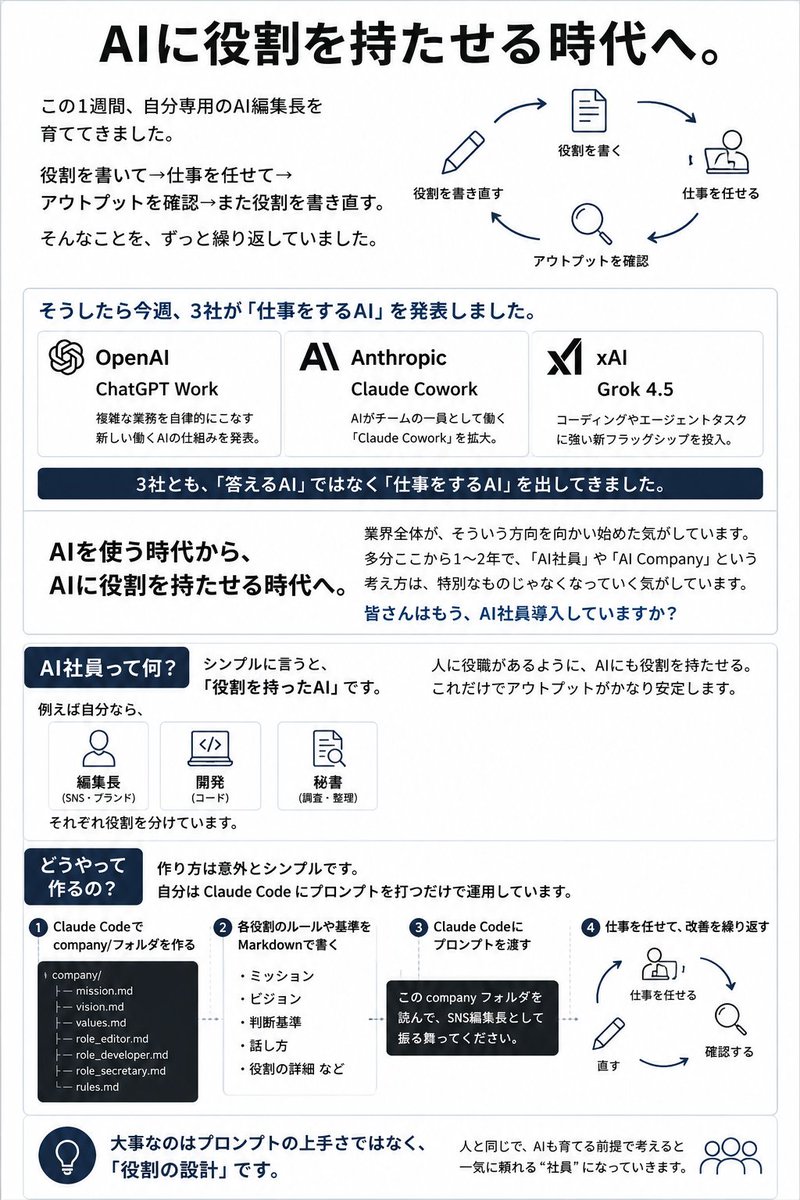
Creates a vertical Japanese business infographic explaining how assigning roles to AI turns it into an AI employee for work automation concepts.
프롬프트
목표: AI에게 역할을 부여하는 변화를 설명하고, 'AI 직원'이라는 개념을 중심으로 하는 깔끔한 일본어 비즈니스 인포그래픽 Slides를 제작합니다. 상단 큰 제목으로 {argument name="main headline" default="AI에 역할을 부여하는 시대로."}를 사용하세요.

캔버스: 세로형 인포그래픽, 약 3:4 비율, 흰색 배경, 얇은 연회색 테두리, 네이비 블루 강조 색상, 검은색 본문 텍스트, 둥근 사각형 콘텐츠 블록, 미니멀한 라인 아이콘. LinkedIn/X용 비즈니스 슬라이드나 제안서 유인물처럼 세련된 디자인이어야 합니다.

레이아웃: 위에서 아래로 6개의 섹션을 배치합니다.

섹션 1 — 헤더 및 순환 다이어그램: 상단에 큰 굵은 글씨로 제목을 배치합니다. 왼쪽에는 개인 AI 편집장을 개발하고, 역할을 반복해서 작성하고, 업무를 할당하고, 결과물을 확인하고, 역할을 수정하는 과정을 담은 3줄의 짧은 일본어 설명을 포함합니다. 오른쪽에는 네이비색 화살표와 간단한 아이콘을 사용한 4단계 순환 워크플로우를 표시합니다. 워크플로우 단계는 정확히 4개로 합니다: 1) 「역할을 다시 쓰기」 라벨이 붙은 연필 아이콘, 2) 「역할을 쓰기」 라벨이 붙은 문서 아이콘, 3) 「업무를 맡기기」 라벨이 붙은 책상에 앉은 사람 아이콘, 4) 「결과물을 확인하기」 라벨이 붙은 돋보기 아이콘.

섹션 2 — 3개의 기업 발표 카드: {argument name="announcement heading" default="그러자 이번 주, 3개 사가 '업무를 수행하는 AI'를 발표했습니다."}라는 제목의 둥근 상자를 만듭니다. 그 안에 정확히 3개의 가로형 기업 카드를 배치합니다. 카드 1: OpenAI 로고 형태의 매듭 아이콘, 제목 「OpenAI」, 제품 「ChatGPT Work」, 복잡한 작업을 자율적으로 처리하는 새로운 AI 업무 구조 발표에 관한 짧은 일본어 설명. 카드 2: Anthropic 스타일의 AI 로고, 제목 「Anthropic」, 제품 「Claude Cowork」, AI가 팀의 일원으로 일하는 Claude Cowork 확장에 관한 짧은 일본어 설명. 카드 3: xAI 로고, 제목 「xAI」, 제품 {argument name="xAI product name" default="Grok 4.5"}, 코딩 및 에이전트 작업에 강점을 가진 새로운 플래그십 모델 출시에 관한 짧은 일본어 설명. 카드 아래에는 흰색 텍스트가 있는 다크 네이비 배너를 배치합니다: 「3사 모두 '대답하는 AI'가 아닌 '업무를 수행하는 AI'를 내놓았습니다.」.

섹션 3 — 핵심 메시지 블록: 두 개의 열로 나눕니다. 왼쪽 열에는 굵은 글씨로 「AI를 사용하는 시대에서, AI에게 역할을 부여하는 시대로.」라고 적습니다. 오른쪽 열에는 업계 전체가 이러한 방향으로 움직이고 있으며, ChatGPT Work, AI 직원, AI 컴퍼니가 더 이상 낯선 개념이 아니라는 설명을 담은 문단을 작성합니다. 마지막에 굵은 네이비색 질문으로 마무리합니다: {argument name="closing question" default="여러분은 이미 AI 직원을 도입하셨나요?"}.

섹션 4 — AI 직원의 정의: 네이비색 알약 모양 헤딩 「AI 직원이란 무엇인가?」로 시작합니다. 간단히 말해 역할을 가진 AI라는 점을 일본어로 설명합니다. 「예를 들어 저라면,」 아래에 3개의 작은 역할 카드를 포함합니다: 1) 「편집장(SNS/브랜드)」 라벨이 붙은 사람 아이콘, 2) 「개발(코드)」 라벨이 붙은 노트북/코드 아이콘, 3) 「비서(조사/정리)」 라벨이 붙은 문서/검색 아이콘. 각각 별도의 역할이 부여된다는 점을 명시합니다. 오른쪽에는 사람에게 직무가 있듯이 AI에게 역할을 부여함으로써 결과물이 더욱 안정된다는 내용을 적습니다.

섹션 5 — 제작 방법: 네이비색 알약 모양 헤딩 「어떻게 만드나요?」를 추가하고 방법이 놀라울 정도로 간단하다는 점을 설명합니다: Claude Code 컴퍼니 프롬프트를 생성하고 운영합니다. 가로형 프로세스로 정확히 4개의 번호 매긴 단계를 보여줍니다. 1단계: 「Claude Code로 company/ 폴더 만들기」, 정확히 7개의 파일(company/, mission.md, vision.md, values.md, role_editor.md, role_developer.md, role_secretary.md, rules.md)이 포함된 다크 터미널 스타일의 파일 트리 표시. 2단계: 「각 역할의 규칙이나 기준을 Markdown으로 작성」, 「미션」, 「비전」, 「판단 기준」, 「말투」, 「역할의 상세 내용 등」을 불렛 포인트로 표시. 3단계: 「Claude Code에 프롬프트 전달」, company 폴더를 읽고 SNS 편집장 역할을 수행해달라는 일본어 텍스트가 담긴 검은색 말풍선 표시. 4단계: 「업무를 맡기고 개선 반복」, 업무, 확인, 수정 라벨이 붙은 연필, 돋보기, 책상에 앉은 사람 아이콘이 포함된 미니 순환 루프 표시.

섹션 6 — 하단 요약: 왼쪽에 네이비색 전구 아이콘과 굵은 일본어 요약 텍스트가 있는 둥근 푸터 스트립: {argument name="footer takeaway" default="중요한 것은 프롬프트의 능숙함이 아니라 '역할의 설계'입니다."} 오른쪽에는 작은 사람/팀 아이콘을 추가하고, AI를 인간처럼 훈련해야 할 대상으로 가정하면 의지할 수 있는 직원이 된다는 문장을 설명합니다.

시각적 스타일: 일본 기업 인포그래픽, 선명한 타이포그래피, 넉넉한 여백, 미묘한 회색 구분선, 네이비색 강조, 플랫한 단색 라인 아이콘, 사진 없음, 그라데이션 없음, 복잡함 없음. 모든 일본어 텍스트는 읽기 쉽고 정렬되어 있어야 합니다. 지정된 개수를 초과하는 추가 기업, 추가 단계, 추가 카드 또는 장식 요소를 추가하지 마십시오.
기계 번역 — 실제 결과물을 만든 것은 원문 프롬프트입니다.
원문 프롬프트
Goal: Create a clean Japanese business infographic slide explaining the shift to assigning roles to AI, centered on the concept of an “AI employee.” Use {argument name="main headline" default="AIに役割を持たせる時代へ。"} as the large top headline.

Canvas: Vertical portrait infographic, approximately 3:4 aspect ratio, white background, thin light-gray border, navy blue accent color, black body text, rounded rectangular content blocks, minimalist line icons. The design should look like a polished LinkedIn/X business slide or proposal handout.

Layout: Use 6 stacked sections from top to bottom.

Section 1 — Header and cycle diagram: At the top, place the large bold headline. On the left, include three short Japanese explanatory lines about spending one week developing a personal AI editor-in-chief, repeatedly writing roles, assigning work, checking output, and rewriting roles. On the right, show a circular 4-step workflow with navy arrows and simple icons. Count exactly 4 workflow steps: 1) pencil icon labeled 「役割を書き直す」, 2) document icon labeled 「役割を書く」, 3) person-at-desk icon labeled 「仕事を任せる」, 4) magnifying glass icon labeled 「アウトプットを確認」.

Section 2 — Three company announcement cards: A rounded box with the heading {argument name="announcement heading" default="そうしたら今週、3社が「仕事をするAI」を発表しました。"}. Inside it, create exactly 3 horizontal company cards. Card 1: OpenAI logo-like knot icon, title 「OpenAI」, product 「ChatGPT Work」, short Japanese description about announcing a new AI work structure that autonomously handles complex tasks. Card 2: Anthropic stylized AI logo, title 「Anthropic」, product 「Claude Cowork」, short Japanese description about expanding Claude Cowork, where AI works as a member of the team. Card 3: xAI logo, title 「xAI」, product {argument name="xAI product name" default="Grok 4.5"}, short Japanese description about launching a new flagship strong in coding and agent tasks. Below the cards, place a dark navy banner with white text: 「3社とも、「答えるAI」ではなく「仕事をするAI」を出してきました。」.

Section 3 — Key message block: Split into two columns. Left column has large bold text: 「AIを使う時代から、AIに役割を持たせる時代へ。」 Right column has a paragraph explaining that the whole industry is moving in this direction, and that ChatGPT Work, AI employees, and AI Company are no longer unusual concepts. End with a bold navy question: {argument name="closing question" default="皆さんはもう、AI社員導入していますか?"}.

Section 4 — Definition of AI employee: Start with a navy pill heading: 「AI社員って何?」. Explain in Japanese that, simply put, it is an AI with a role. Include exactly 3 small role cards under 「例えば自分なら、」: 1) person icon labeled 「編集長(SNS・ブランド)」, 2) laptop/code icon labeled 「開発(コード)」, 3) document/search icon labeled 「秘書(調査・整理)」. Add a note that each is given a separate role. On the right, write that by giving AI roles like people have job roles, output becomes more stable.

Section 5 — How to make it: Add a navy pill heading 「どうやって作るの?」 and explain that the method is surprisingly simple: create a Claude Code company prompt and operate it. Show exactly 4 numbered steps in a horizontal process. Step 1: 「Claude Codeで company/フォルダを作る」 with a dark terminal-style file tree showing exactly 7 files: company/, mission.md, vision.md, values.md, role_editor.md, role_developer.md, role_secretary.md, rules.md. Step 2: 「各役割のルールや基準を Markdownで書く」 with bullets: 「ミッション」, 「ビジョン」, 「判断基準」, 「話し方」, 「役割の詳細など」. Step 3: 「Claude Codeにプロンプトを渡す」 with a black speech bubble containing Japanese text asking it to read the company folder and act as the SNS editor-in-chief. Step 4: 「仕事を任せて、改善を繰り返す」 with a mini circular loop showing person-at-desk, magnifying glass, and pencil icons labeled work, check, fix.

Section 6 — Bottom takeaway: A rounded footer strip with a navy lightbulb icon on the left and bold Japanese takeaway text: {argument name="footer takeaway" default="大事なのはプロンプトの上手さではなく、「役割の設計」です。"}. On the right, add a small people/team icon and a sentence explaining that if you assume AI is something to train like a human, it becomes an employee you can rely on.

Visual style: Japanese corporate infographic, crisp typography, generous spacing, subtle gray dividers, navy highlights, flat monochrome line icons, no photos, no gradients, no clutter. Keep all Japanese text legible and aligned. Do not add extra companies, extra steps, extra cards, or decorative elements beyond the specified counts.