Split Pixel Art Canvas
Generates a two-panel pixel art comparison canvas with a selected ocean fish scene and a misty mountain landscape.
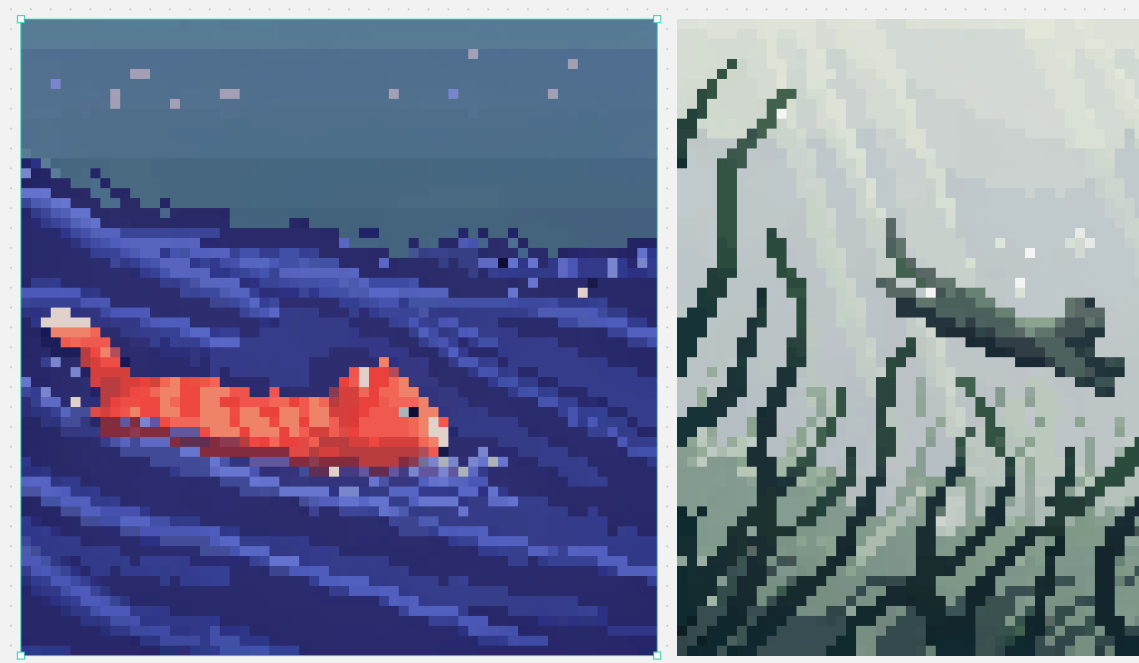
프롬프트
목표: 디자인 캔버스 스타일로 2개의 정사각형 픽셀 아트 패널을 나란히 배치한 분할 화면 비교 이미지를 생성합니다.

캔버스: 약 1139×671 px 크기의 가로형 캔버스이며, 배경은 작은 회색 점들이 흩뿌려진 밝은 회색 작업 공간입니다. 가로로 정렬된 두 개의 큰 정사각형 아트워크를 배치하고 그 사이에 좁은 수직 간격을 둡니다. 왼쪽 아트워크에만 편집기에서 선택된 것처럼 밝은 청록색의 선택 테두리와 작은 정사각형 모서리/가장자리 핸들을 추가합니다.

레이아웃: 왼쪽 패널은 캔버스 너비의 절반보다 약간 더 넓게 차지하며 청록색 선택 상자로 둘러싸여 있습니다. 오른쪽 패널은 높이는 같지만 보이는 영역이 약간 더 좁으며 오른쪽 끝에 맞추어 배치합니다. 두 아트워크 모두 안티앨리어싱 없이 선명한 정사각형 픽셀을 사용한 저해상도 블록 픽셀 아트로 렌더링합니다.

왼쪽 패널 주제: 짙은 남색과 파란색 픽셀 아트로 표현된 밤바다 장면. 작고 주황빛이 도는 붉은색 잉어나 금붕어가 왼쪽에서 오른쪽으로 헤엄치고 있으며, 꼬리 끝은 연한 크림색이고 분절된 몸체에는 더 밝은 주황색 하이라이트가 있습니다. 물은 대각선 파도 줄무늬와 보라색, 연보라색, 일렉트릭 블루 색상의 층진 가로 띠로 이루어진 짙은 남색입니다. 상단 3분의 1은 차분한 청회색 밤하늘이며, 연한 라벤더색, 분홍색, 파란색의 작은 정사각형 별 모양 픽셀 8개가 흩어져 있습니다. 분위기: 차분함, 레트로 게임 장면, 수중/밤바다 풍경.

오른쪽 패널 주제: 채도가 낮은 녹회색 픽셀 아트로 표현된 안개 낀 산 풍경. 높고 뾰족한 산등성이와 절벽이 프레임을 채우고 있으며, 짙은 청록색 윤곽선과 각진 눈 또는 안개 낀 흰색 면이 포함되어 있습니다. 오른쪽 중앙을 가로지르는 구불구불한 어두운 능선이나 나뭇가지 모양의 바위턱을 포함하고, 배경 상단에는 연한 안개 분위기를 연출합니다. 차분한 세이지색, 회색, 오프 화이트, 짙은 숲 녹색 톤을 사용합니다.

시각적 스타일: 정통 16비트 픽셀 아트, 크게 보이는 정사각형 픽셀, 제한된 색상 팔레트, 높은 대비의 실루엣, 계단식 픽셀 디더링 외에는 부드러운 그라데이션 없음. 두 패널이 서로 다른 픽셀 아트 모델의 예시처럼 느껴지도록 왼쪽은 다채로운 수중 장면, 오른쪽은 단색의 안개 낀 판타지 풍경으로 구성합니다.

사용자 지정 세부 정보: 왼쪽 물고기 색상 {argument name="fish color" default="orange-red"}; 왼쪽 장면 테마 {argument name="left scene theme" default="night ocean"}; 오른쪽 풍경 테마 {argument name="right landscape theme" default="misty green-gray mountains"}; 픽셀 아트 크기 {argument name="pixel art scale" default="large crisp square pixels"}; 선택 테두리 색상 {argument name="selection outline color" default="bright cyan"}.

제약 사항: 정확히 2개의 메인 이미지 패널을 표시합니다. 텍스트, 로고, 캐릭터, UI 메뉴 또는 워터마크를 추가하지 마십시오. 왼쪽 패널에만 편집기 스타일의 청록색 선택 테두리를 유지하십시오.
기계 번역 — 실제 결과물을 만든 것은 원문 프롬프트입니다.
원문 프롬프트
Goal: Create a split-screen pixel art comparison image in the style of a design canvas, showing exactly 2 square pixel-art panels side by side.

Canvas: Wide horizontal canvas, about 1139×671 px, light gray workspace background with tiny scattered gray speckles. Place two large square artworks aligned horizontally with a narrow vertical gap between them. Add a thin bright cyan selection outline with small square corner/edge handles around the left artwork only, as if it is selected in an editor.

Layout: Left panel occupies slightly more than half the canvas width and is framed by the cyan selection box. Right panel is the same height but slightly narrower in the visible crop, flush to the right side. Keep both artworks rendered as low-resolution blocky pixel art with crisp square pixels and no antialiasing.

Left panel subject: A night ocean scene in deep indigo and blue pixel art. A small orange-red koi or goldfish swims from left to right in the lower left-to-center area, with a pale cream tail tip and lighter orange highlights on its segmented body. The water is dark navy with diagonal wave streaks and layered horizontal bands in violet, periwinkle, and electric blue. The upper third is a muted blue-gray night sky with exactly 8 small square star-like pixels scattered across it in pale lavender, pink, and blue. Mood: calm, retro game scene, underwater/night seascape.

Right panel subject: A misty mountainous landscape rendered in desaturated green-gray pixel art. Tall jagged mountain ridges and cliff faces fill the frame, with dark teal outlines and angular snowy or misty white planes. Include a winding dark ridge or branch-like ledge crossing the mid-right area, and pale foggy atmosphere in the upper background. Use muted sage, gray, off-white, and dark forest-green tones.

Visual style: authentic 16-bit pixel art, large visible square pixels, limited color palettes, high contrast silhouettes, no smooth gradients except stepped pixel dithering. Make the two panels feel like examples from different pixel-art models: left colorful and aquatic, right monochrome misty fantasy landscape.

Customizable details: left fish color {argument name="fish color" default="orange-red"}; left scene theme {argument name="left scene theme" default="night ocean"}; right landscape theme {argument name="right landscape theme" default="misty green-gray mountains"}; pixel art scale {argument name="pixel art scale" default="large crisp square pixels"}; selection outline color {argument name="selection outline color" default="bright cyan"}.

Constraints: Show exactly 2 main image panels. Do not add text, logos, characters, UI menus, or watermarks. Preserve the editor-like cyan selection border only around the left panel.