太空資產庫用戶介面
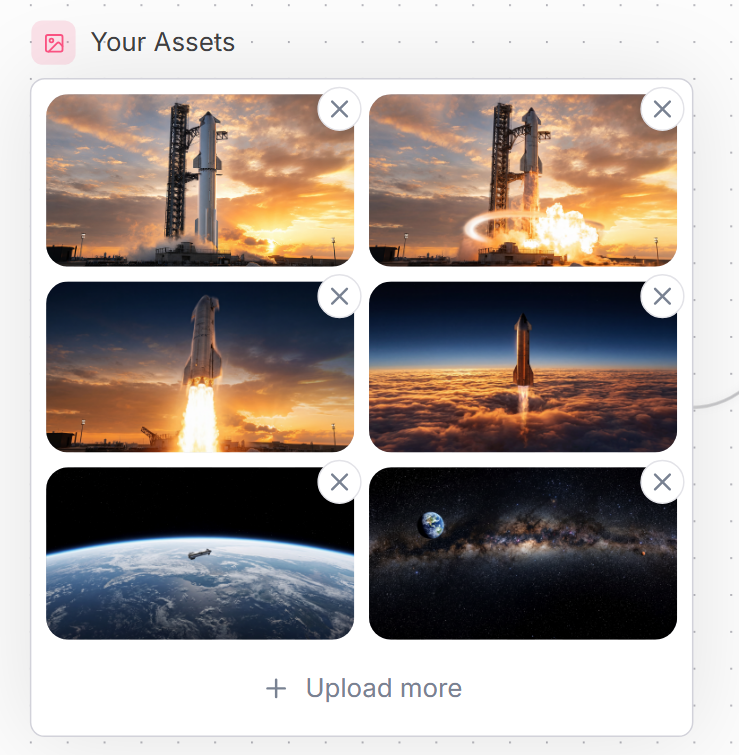
A polished SaaS-style asset upload gallery mockup with six spaceflight thumbnails and delete controls for website interface design.
Prompt
目標:製作一個乾淨的網站 UI 資源管理器面板,標題為 {argument name="headline text" default="Your Assets"},顯示一個上傳的太空飛行圖片網格。

畫布:方形網路模型在非常淺的背景上,帶有微妙的點狀網格圖案和右側邊緣的微弱曲線裝飾線。使用現代 SaaS 風格,帶有柔軟陰影、圓角和柔和的藍灰色文字。

佈局:在左上角放置一個小圓角粉色方塊圖標,裡面是簡單的輪廓圖片/照片符號,然後是標題。下方,創建一個大白色圓角矩形卡片,帶有細 pale gray 邊框。卡片內放置精確 6 個圖片縮略圖,以 2 列 3 行網格排列,每個縮略圖有圓角。每個縮略圖有一個浮動圓形刪除按鈕,覆蓋其右上角;精確有 6 個刪除按鈕,每個白色帶有灰色 X 圖標。卡片底部,居中一個上傳操作行,帶有加號和文字 {argument name="upload text" default="Upload more"}。

縮略圖內容,精確 6 個:1) 左上:一枚高聳火箭矗立在發射台上,日落時分,橙色雲層;2) 右上:同一火箭發射台場景,有明亮爆炸/火焰和發光圓形衝擊波效果;3) 中左:火箭垂直升空,帶有大型明亮尾焰,背景是日落天空;4) 中右:火箭上升穿過密集橙色雲層,進入深藍色上層大氣;5) 左下:從低軌道看到的地球,一個小型航天器在曲線地平線上;6) 右下:星空深空全景,有銀河帶,地球在左上角可見。

視覺風格:精緻的網路組件截圖,真實電影式太空縮略圖,清晰 UI 邊緣,充足間距,圓角 16px 縮略圖角落,微妙陰影,柔軟中性色調。使用 {argument name="accent color" default="soft pink"} 作為小圖片圖標背景,{argument name="text color" default="slate blue-gray"} 作為標題和上傳文字。

限制:保持所有文字為英文,不包含額外標籤、無水印、無瀏覽器介面、無游標。維持精確計數:1 個標題、1 個圖標、1 個邊框卡片、6 個縮略圖、6 個圓形 X 刪除按鈕和 1 個底部上傳操作。
機器翻譯 — 實際產出作品的是原文 prompt。
原文 Prompt
Goal: Create a clean website UI asset manager panel titled {argument name="headline text" default="Your Assets"}, showing a grid of uploaded spaceflight images.

Canvas: Square-ish web mockup on a very light background with a subtle dotted grid pattern and faint curved decorative line on the right edge. Use a modern SaaS style with soft shadows, rounded corners, and muted blue-gray text.

Layout: At the top left, place a small rounded pink square icon containing a simple outlined image/photo symbol, followed by the headline. Below it, create one large white rounded rectangle card with a thin pale gray border. Inside the card, place exactly 6 image thumbnails in a 2-column by 3-row grid, each thumbnail with rounded corners. Each thumbnail has a floating circular delete button overlapping its top-right corner; there are exactly 6 delete buttons, each white with a gray X icon. At the bottom of the card, center an upload action row with a plus sign and the text {argument name="upload text" default="Upload more"}.

Thumbnail contents, exactly 6: 1) top-left: a tall rocket standing on a launch pad at sunset with orange clouds; 2) top-right: the same rocket launch pad scene with bright explosion/flame and a glowing circular shockwave effect; 3) middle-left: a rocket lifting off vertically with a large bright plume against a sunset sky; 4) middle-right: a rocket ascending above a dense orange cloud layer into a dark blue upper atmosphere; 5) bottom-left: Earth seen from low orbit with a small spacecraft over the curved horizon; 6) bottom-right: a starry deep-space panorama with the Milky Way band and Earth visible near the upper left.

Visual style: Polished web component screenshot, realistic cinematic space thumbnails, crisp UI edges, generous spacing, rounded 16px thumbnail corners, subtle shadows, soft neutral palette. Use {argument name="accent color" default="soft pink"} for the small image icon background and {argument name="text color" default="slate blue-gray"} for the title and upload text.

Constraints: Keep all text in English, include no extra labels, no watermark, no browser chrome, no cursor. Maintain the exact counts: 1 title, 1 icon, 1 bordered card, 6 thumbnails, 6 circular X delete buttons, and 1 bottom upload action.