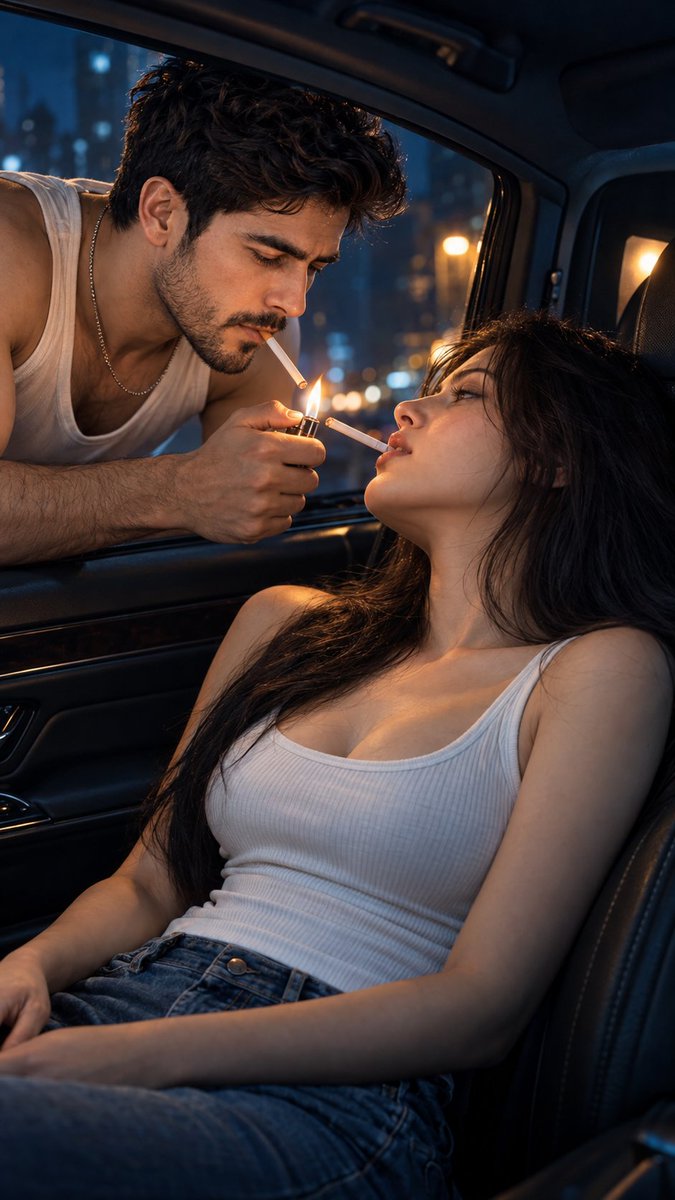
Midnight flame car portrait
回視聴2,240
いいね44
コメント2
シェア3
ブックマーク27
引用0
Hyper-realistic IMAX-level Netflix-style cinematic couple portrait, 9:16 vertical. Use the uploaded image as the primary visual reference and preserve both subjects' exact facial identities, proportions, and defining features. Create an adult couple sharing an intimate, cinematic moment inside a car at night. The man wears a white sleeveless tank top and a delicate silver chain necklace, while the woman wears a fitted white ribbed tank top with blue denim bottoms. The man's dark hair is styled in a voluminous, casually swept-back hairstyle with naturally textured strands, complemented by short, neatly trimmed facial hair. The woman has long, straight, jet-black hair cascading over her shoulders and down the seat. The man leans through the open car window from the left, bending his upper body toward the woman, a cigarette held between his lips. His hand reaches forward with a lit lighter, positioning its small flame beneath the cigarette. The woman reclines in the passenger seat, her head tilted backward and turned toward him, lips slightly parted with a cigarette held between them. Her face angles upward toward the flame, while her body rests against the seat and her hands remain relaxed near her lap. Their faces are close together, creating a quiet, intimate moment illuminated by the lighter. Fair luminous porcelain skin with a bright ivory to light beige tone and a neutral-cool undertone for the woman, with natural realistic skin texture and soft highlights; preserve the man's natural skin tone and realistic facial texture. The scene takes place inside a modern car with dark upholstery, an open side window, and a shadowy dashboard. Blurred city lights glow outside, while a warm light source shines through the passenger-side window. Apply cinematic night-scene colour grading with deep midnight-blue and teal shadows contrasted against the lighter's warm golden-orange flame. Use rich, controlled blacks, coo


