Mechanical Keyboard Product Page Mockup
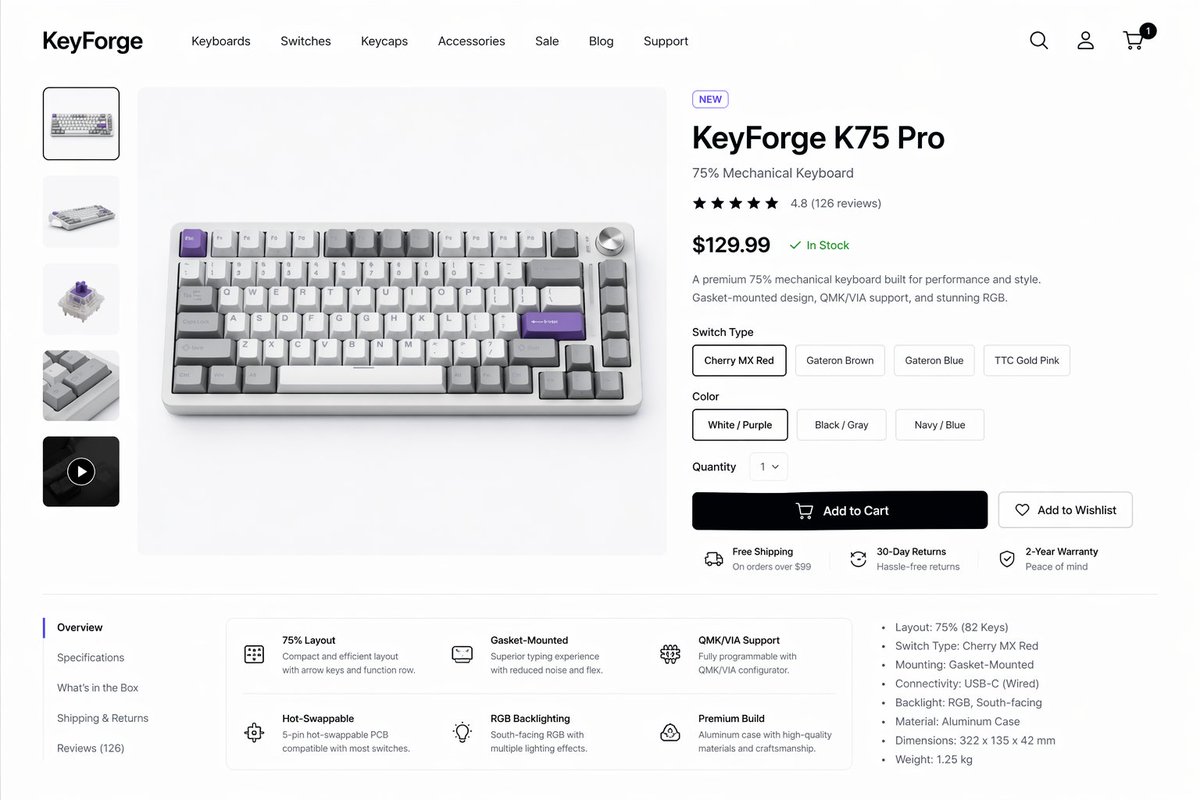
This generates a polished desktop e-commerce product page for a premium mechanical keyboard, suitable for product design showcases, storefront concepts, and UI mockups.
프롬프트
{argument name="brand name" default="KeyForge"}라는 프리미엄 기계식 키보드 브랜드를 위한 깔끔하고 현대적인 이커머스 제품 상세 페이지를 제작하세요. 흰색 배경에 은은한 연회색 구분선과 넉넉한 여백을 활용한 고해상도 데스크톱 웹사이트 목업 형태로 제시합니다. 레이아웃은 상단 내비게이션 바, 왼쪽 제품 썸네일 레일, 중앙의 대형 제품 히어로 이미지, 오른쪽 구매 정보 패널로 구성된 단일 통합 스토어프론트 장면입니다. 헤더의 맨 왼쪽에는 굵은 워드마크를 배치하고, 그 옆으로 “Keyboards”, “Switches”, “Keycaps”, “Accessories”, “Sale”, “Blog”, “Support”라고 적힌 7개의 내비게이션 항목을 넣으세요. 맨 오른쪽에는 검색, 계정, 장바구니 아이콘 3개를 배치하고, 장바구니 아이콘 위에는 “1”이 표시된 작은 검은색 알림 배지를 추가합니다. 중앙에 표시된 메인 제품은 연회색 무대 위에 살짝 높은 전면 각도에서 촬영된 콤팩트한 75% 기계식 키보드로, 실버 알루미늄 케이스, 흰색 및 회색 키캡, 라벤더 퍼플 색상의 포인트 키 몇 개, 오른쪽 상단의 실버 볼륨 노브가 특징입니다. 왼쪽 수직 갤러리에는 정확히 5개의 썸네일을 포함하세요: 선택된 전면 제품 샷 1개, 키보드 측면 뷰 1개, 기계식 스위치 클로즈업 1개, 키캡 질감 클로즈업 1개, 원형 재생 아이콘이 있는 어두운 영상 썸네일 1개. 오른쪽 제품 패널에는 “NEW”라고 적힌 작은 알약 모양 배지, 크고 굵은 제품명 {argument name="product name" default="KeyForge K75 Pro"}, “75% Mechanical Keyboard”라는 부제목, 4.8점과 “(126 reviews)”가 표시된 별 5개 평점 행, 크고 굵은 가격 {argument name="price" default="$129.99"}과 그 뒤를 잇는 녹색 “In Stock” 상태 표시, 그리고 프리미엄 성능, 가스켓 마운트 디자인, QMK/VIA 지원, RGB에 대한 짧은 두 문장의 설명을 포함하세요. 그 아래에는 “Cherry MX Red”, “Gateron Brown”, “Gateron Blue”, “TTC Gold Pink”라고 라벨이 붙은 4개의 알약 모양 버튼으로 구성된 “Switch Type” 선택기를 배치하고 첫 번째 항목을 선택 상태로 만드세요. 또한 “White / Purple”, “Black / Gray”, “Navy / Blue”라고 라벨이 붙은 3개의 알약 모양 버튼으로 구성된 “Color” 선택기를 배치하고 첫 번째 항목을 선택 상태로 만드세요. “Quantity” 드롭다운은 “1”로 설정하고, 장바구니 아이콘이 포함된 “Add to Cart”라는 큰 검은색 기본 버튼 1개와 하트 아이콘이 포함된 “Add to Wishlist”라는 외곽선 형태의 보조 버튼 1개를 배치하세요. 버튼 아래에는 작은 아이콘과 함께 3개의 가로형 서비스 강조 항목을 표시하세요: “Free Shipping”(하단 텍스트 “On orders over $99”), “30-Day Returns”(하단 텍스트 “Hassle-free returns”), “2-Year Warranty”(하단 텍스트 “Peace of mind”). 하단 콘텐츠 영역에는 얇은 선으로 구분된 2단 섹션을 만드세요. 왼쪽에는 “Overview”(선택됨), “Specifications”, “What’s in the Box”, “Shipping & Returns”, “Reviews (126)” 등 정확히 5개의 항목으로 구성된 수직 탭 목록을 배치하세요. 탭 오른쪽에는 2행 3열로 구성된 6개의 기능 블록이 있는 둥근 흰색 기능 카드 그리드를 배치하고, 각 블록에는 간단한 라인 아이콘, 굵은 제목, 짧은 설명 텍스트(“75% Layout”, “Gasket-Mounted”, “QMK/VIA Support”, “Hot-Swappable”, “RGB Backlighting”, “Premium Build”)를 넣으세요. 이 하단 영역의 맨 오른쪽에는 “Layout: 75% (82 Keys)”, “Switch Type: Cherry MX Red”, “Mounting: Gasket-Mounted”, “Connectivity: USB-C (Wired)”, “Backlight: RGB, South-facing”, “Material: Aluminum Case”, “Dimensions: 322 x 135 x 42 mm”, 그리고 마지막으로 “Weight: 1.25 kg” 등 총 7개의 불렛 포인트로 구성된 사양 목록을 추가하세요. 세련된 미니멀리스트 제품 디자인 미학, 사실적인 UI 간격, Inter나 SF Pro와 유사한 깔끔한 산세리프 서체, 부드러운 그림자, 은은한 둥근 모서리, 단색 아이콘, 세련된 스타트업 스타일의 소비자 가전 프레젠테이션을 사용하세요.
기계 번역 — 실제 결과물을 만든 것은 원문 프롬프트입니다.
원문 프롬프트
Create a clean modern e-commerce product detail page for a premium mechanical keyboard brand called {argument name="brand name" default="KeyForge"}, presented as a high-fidelity desktop website mockup on a white background with subtle light-gray dividers and generous spacing. The layout is a single unified storefront scene with a top navigation bar, a left product thumbnail rail, a large center product hero image, and a right-side purchase information panel. In the header, place the bold wordmark on the far left, then 7 navigation items reading “Keyboards”, “Switches”, “Keycaps”, “Accessories”, “Sale”, “Blog”, and “Support”, and on the far right 3 icons for search, account, and cart, with a small black notification badge showing “1” on the cart. The main product shown in the center is a compact 75% mechanical keyboard photographed from a slightly elevated front angle on a pale gray stage, with an aluminum case in silver, white and gray keycaps, several accent keys in lavender purple, and a silver volume knob at the top right. The left vertical gallery contains exactly 5 thumbnails: 1 selected front product shot, 1 angled keyboard view, 1 mechanical switch close-up, 1 keycap texture close-up, and 1 dark video thumbnail with a circular play icon. The right product panel includes a small pill badge reading “NEW”, a large bold product name {argument name="product name" default="KeyForge K75 Pro"}, a subtitle “75% Mechanical Keyboard”, a 5-star rating row with 4.8 and “(126 reviews)”, a large bold price {argument name="price" default="$129.99"} followed by a green “In Stock” status, and a short two-sentence description about premium performance, gasket-mounted design, QMK/VIA support, and RGB. Under that, include a “Switch Type” selector with exactly 4 pill buttons labeled “Cherry MX Red”, “Gateron Brown”, “Gateron Blue”, and “TTC Gold Pink”, with the first selected; a “Color” selector with exactly 3 pill buttons labeled “White / Purple”, “Black / Gray”, and “Navy / Blue”, with the first selected; a “Quantity” dropdown set to “1”; one large black primary button labeled “Add to Cart” with a cart icon; and one outlined secondary button labeled “Add to Wishlist” with a heart icon. Beneath the buttons, show exactly 3 horizontal service highlights with small icons: “Free Shipping” with subtext “On orders over $99”, “30-Day Returns” with subtext “Hassle-free returns”, and “2-Year Warranty” with subtext “Peace of mind”. In the lower content area, create a two-column section separated by light lines. On the left is a vertical tab list with exactly 5 items: “Overview” selected, then “Specifications”, “What’s in the Box”, “Shipping & Returns”, and “Reviews (126)”. To the right of the tabs, place a rounded white feature card grid with exactly 6 feature blocks in 2 rows of 3, each with a simple line icon, bold title, and short explanatory text: “75% Layout”, “Gasket-Mounted”, “QMK/VIA Support”, “Hot-Swappable”, “RGB Backlighting”, and “Premium Build”. On the far right of this lower area, add a specifications bullet list with exactly 7 bullets: “Layout: 75% (82 Keys)”, “Switch Type: Cherry MX Red”, “Mounting: Gasket-Mounted”, “Connectivity: USB-C (Wired)”, “Backlight: RGB, South-facing”, “Material: Aluminum Case”, and “Dimensions: 322 x 135 x 42 mm”, plus an additional final bullet “Weight: 1.25 kg”. Use a refined minimalist product-design aesthetic, realistic UI spacing, clean sans-serif typography similar to Inter or SF Pro, soft shadows, subtle rounded corners, monochrome icons, and polished startup-style consumer electronics presentation.