Space Asset Gallery UI
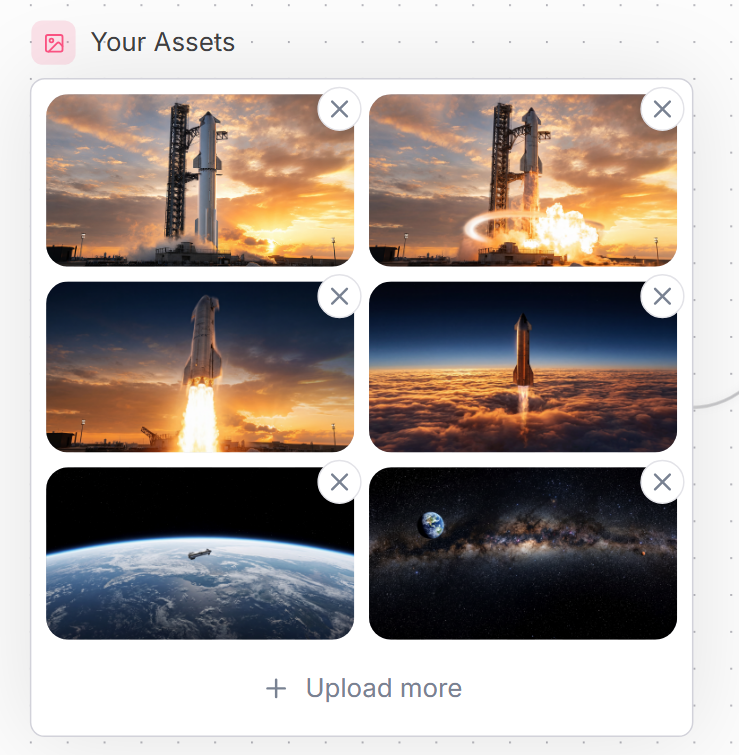
A polished SaaS-style asset upload gallery mockup with six spaceflight thumbnails and delete controls for website interface design.
프롬프트
목표: {argument name="headline text" default="Your Assets"}라는 제목의 깔끔한 웹사이트 UI 에셋 관리자 패널을 생성하고, 업로드된 우주 비행 이미지 그리드를 표시합니다.

캔버스: 매우 밝은 배경에 은은한 점선 그리드 패턴과 오른쪽 가장자리에 희미한 곡선 장식 선이 있는 정사각형 형태의 웹 목업입니다. 부드러운 그림자, 둥근 모서리, 차분한 블루 그레이 텍스트를 사용하여 현대적인 SaaS 스타일을 연출하세요.

레이아웃: 왼쪽 상단에 간단한 이미지/사진 기호가 포함된 작은 둥근 분홍색 정사각형 아이콘을 배치하고 그 뒤에 제목을 넣습니다. 그 아래에는 얇은 연회색 테두리가 있는 하나의 큰 흰색 둥근 직사각형 카드를 만듭니다. 카드 내부에는 2열 3행 그리드로 총 6개의 이미지 썸네일을 배치하며, 각 썸네일은 둥근 모서리를 가집니다. 각 썸네일의 오른쪽 상단 모서리에는 겹쳐진 원형 삭제 버튼이 떠 있습니다. 총 6개의 삭제 버튼이 있으며, 각각은 회색 X 아이콘이 있는 흰색 버튼입니다. 카드 하단 중앙에는 더하기 기호와 {argument name="upload text" default="Upload more"}라는 텍스트가 포함된 업로드 작업 행을 배치합니다.

썸네일 콘텐츠(총 6개): 1) 왼쪽 상단: 주황색 구름이 있는 일몰의 발사대에 서 있는 높은 로켓; 2) 오른쪽 상단: 밝은 폭발/화염과 빛나는 원형 충격파 효과가 있는 동일한 로켓 발사대 장면; 3) 왼쪽 중간: 일몰 하늘을 배경으로 거대한 밝은 연기를 내뿜으며 수직으로 이륙하는 로켓; 4) 오른쪽 중간: 짙은 주황색 구름층 위로 솟아올라 어두운 파란색 상층 대기로 진입하는 로켓; 5) 왼쪽 하단: 곡선 지평선 너머로 작은 우주선이 보이는 저궤도에서 본 지구; 6) 오른쪽 하단: 은하수 띠와 왼쪽 상단 근처에 지구가 보이는 별이 빛나는 심우주 파노라마.

시각적 스타일: 세련된 웹 컴포넌트 스크린샷, 사실적인 영화 같은 우주 썸네일, 선명한 UI 가장자리, 넉넉한 간격, 16px의 둥근 썸네일 모서리, 은은한 그림자, 부드러운 중립 팔레트. 작은 이미지 아이콘 배경에는 {argument name="accent color" default="soft pink"}를 사용하고, 제목과 업로드 텍스트에는 {argument name="text color" default="slate blue-gray"}를 사용하세요.

제약 사항: 모든 텍스트는 영어로 유지하고, 추가 라벨, 워터마크, 브라우저 크롬, 커서는 포함하지 마세요. 제목 1개, 아이콘 1개, 테두리가 있는 카드 1개, 썸네일 6개, 원형 X 삭제 버튼 6개, 하단 업로드 작업 1개라는 정확한 개수를 유지하세요.
기계 번역 — 실제 결과물을 만든 것은 원문 프롬프트입니다.
원문 프롬프트
Goal: Create a clean website UI asset manager panel titled {argument name="headline text" default="Your Assets"}, showing a grid of uploaded spaceflight images.

Canvas: Square-ish web mockup on a very light background with a subtle dotted grid pattern and faint curved decorative line on the right edge. Use a modern SaaS style with soft shadows, rounded corners, and muted blue-gray text.

Layout: At the top left, place a small rounded pink square icon containing a simple outlined image/photo symbol, followed by the headline. Below it, create one large white rounded rectangle card with a thin pale gray border. Inside the card, place exactly 6 image thumbnails in a 2-column by 3-row grid, each thumbnail with rounded corners. Each thumbnail has a floating circular delete button overlapping its top-right corner; there are exactly 6 delete buttons, each white with a gray X icon. At the bottom of the card, center an upload action row with a plus sign and the text {argument name="upload text" default="Upload more"}.

Thumbnail contents, exactly 6: 1) top-left: a tall rocket standing on a launch pad at sunset with orange clouds; 2) top-right: the same rocket launch pad scene with bright explosion/flame and a glowing circular shockwave effect; 3) middle-left: a rocket lifting off vertically with a large bright plume against a sunset sky; 4) middle-right: a rocket ascending above a dense orange cloud layer into a dark blue upper atmosphere; 5) bottom-left: Earth seen from low orbit with a small spacecraft over the curved horizon; 6) bottom-right: a starry deep-space panorama with the Milky Way band and Earth visible near the upper left.

Visual style: Polished web component screenshot, realistic cinematic space thumbnails, crisp UI edges, generous spacing, rounded 16px thumbnail corners, subtle shadows, soft neutral palette. Use {argument name="accent color" default="soft pink"} for the small image icon background and {argument name="text color" default="slate blue-gray"} for the title and upload text.

Constraints: Keep all text in English, include no extra labels, no watermark, no browser chrome, no cursor. Maintain the exact counts: 1 title, 1 icon, 1 bordered card, 6 thumbnails, 6 circular X delete buttons, and 1 bottom upload action.