程式設計狗漫畫
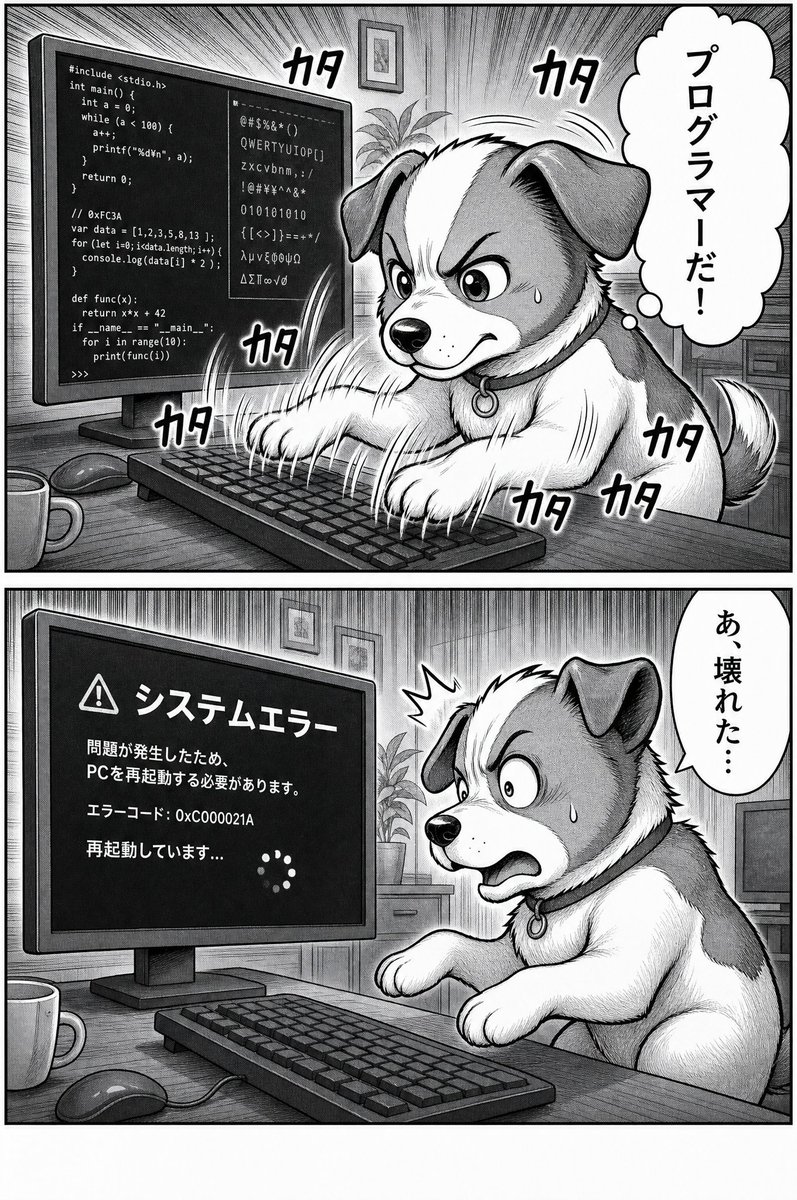
A two-panel black-and-white manga comic showing a dog coding furiously before triggering a Japanese system error screen.
Prompt
目標:製作一個關於一隻狗在桌上型電腦上瘋狂編程,然後導致系統錯誤的黑白漫畫頁面。

畫布:垂直漫畫頁面,灰階色調,傳統漫畫墨水和網點風格,粗重的面板邊框和詳細的交叉陰影。使用 exactly 2 個水平面板垂直堆疊,由粗厚的白色間隔分開。

佈局:面板 1 佔據上半部分。面板 2 佔據下半部分。兩個面板都以稍微傾斜的側視圖展示相同的家庭辦公室書桌:左側有一個大型桌上型顯示器,前景有鍵盤,書桌上有滑鼠和杯子,背景有植物和裝裱的牆藝術。

面板 1:一隻毛茸茸的中型狗,有垂耳、白色口鼻和胸部,耳朵和斑點較深,坐在書桌上,用兩隻前爪在鍵盤上瘋狂打字。狗的頭部區域大部分被一個純色垂直灰色矩形審查區塊覆蓋,位於面板中央,遮蓋了大部分臉部,但露出耳朵、爪子、身體和尾巴。顯示器顯示混合的程式代碼和無意義符號,包括類 C 程式碼、類 JavaScript 行、類 Python 行、二進位數字和隨機字元。添加從顯示器和打字動作輻射出的戲劇性漫畫速度線。包括 exactly 7 個可見的日語打字音效詞「カタ」:一個在狗/顯示器區域的左上角附近,一個在右上中心附近,一個在下部顯示器/鍵盤區域附近,一個在鍵盤左邊緣附近,三個聚集在狗的右下身體和尾巴周圍。在右側添加一個垂直雲朵狀思考氣泡,內有日語文字:「プログラマーだ!」。

面板 2:同一隻狗受驚和恐慌,從鍵盤向後傾斜,眼睛睜大,嘴巴張開,爪子抬起,臉頰上有汗滴,頭部附近有一個小衝擊爆發。顯示器現在顯示一個深色系統錯誤畫面,帶有警告三角形圖標和日語文字。使用 exactly 這個顯示器文字:「システムエラー」、「問題が発生したため、PCを再起動する必要があります。」、「エラーコード: 0xC000021A」、「再起動しています...」,加上一個由小點組成的圓形載入旋轉器。在右側添加一個垂直對話氣泡,內有日語文字:「あ、壊れた…」。

視覺風格:高細節單色漫畫,表達性動物角色像人類一樣行動,密集的交叉陰影,網點陰影,強烈的運動線,粗體手寫日語音效詞, slightly 喜劇語調,清晰可讀的文字在顯示器和氣泡上。

可自訂主題:狗應該是 {argument name="animal character" default="a fluffy floppy-eared dog"}。漫畫的第一個思考氣泡應該說 {argument name="first bubble text" default="プログラマーだ!」}。第二個對話氣泡應該說 {argument name="second bubble text" default="あ、壊れた…」}。顯示器錯誤標題應該是 {argument name="error headline" default="システムエラー」}。錯誤代碼應該是 {argument name="error code" default="0xC000021A」}。

限制:保持圖片只有黑白,保留兩面板佈局,使用 exactly 2 個對話/思考氣泡總共, exactly 7 個打字音效詞在頂部面板,無額外面板,無顏色,無浮水印。
機器翻譯 — 實際產出作品的是原文 prompt。
原文 Prompt
Goal: Create a black-and-white manga comic page about a dog frantically programming on a desktop computer, then causing a system error.

Canvas: Vertical comic page in grayscale, traditional manga ink-and-screentone style, with heavy panel borders and detailed hatching. Use exactly 2 horizontal panels stacked vertically, separated by a thick white gutter.

Layout: Panel 1 occupies the top half. Panel 2 occupies the bottom half. Both panels show the same home office desk from a slightly angled side view: a large desktop monitor on the left, keyboard in the foreground, mouse and mug on the desk, a plant and framed wall art in the background.

Panel 1: A fluffy medium-sized dog with floppy ears, white muzzle and chest, darker ears and patches, sits at the desk and types furiously with both front paws on the keyboard. The dog’s head area is largely covered by a plain vertical gray rectangle censor block in the center of the panel, obscuring most of the face while leaving ears, paws, body, and tail visible. The monitor displays mixed programming code and gibberish symbols, including C-like code, JavaScript-like lines, Python-like lines, binary digits, and random characters. Add dramatic manga speed lines radiating from the monitor and typing action. Include exactly 7 visible Japanese typing sound effects reading 「カタ」: one near the upper left of the dog/monitor area, one near the top center-right, one near the lower monitor/keyboard area, one near the left keyboard edge, and three clustered around the dog’s lower right body and tail. Add one vertical cloud-shaped thought bubble on the right with Japanese text: 「プログラマーだ!」.

Panel 2: The same dog is startled and panicking, leaning back from the keyboard with wide eyes, open mouth, raised paws, a sweat drop on the cheek, and a small shock burst near the head. The monitor now shows a dark system error screen with a warning triangle icon and Japanese text. Use exactly this monitor text: 「システムエラー」, 「問題が発生したため、PCを再起動する必要があります。」, 「エラーコード: 0xC000021A」, 「再起動しています...」, plus a circular loading spinner made of small dots. Add one vertical speech bubble on the right with Japanese text: 「あ、壊れた…」.

Visual style: High-detail monochrome manga, expressive animal character acting like a human, dense cross-hatching, screentone shading, strong motion lines, bold hand-lettered Japanese sound effects, slightly comedic tone, clean readable text on the monitor and bubbles.

Customizable subject: The dog should be {argument name="animal character" default="a fluffy floppy-eared dog"}. The comic’s first thought bubble should say {argument name="first bubble text" default="プログラマーだ!"}. The second speech bubble should say {argument name="second bubble text" default="あ、壊れた…"}. The monitor error headline should be {argument name="error headline" default="システムエラー"}. The error code should be {argument name="error code" default="0xC000021A"}.

Constraints: Keep the image black and white only, preserve the two-panel layout, use exactly 2 speech/thought bubbles total, exactly 7 typing sound effects in the top panel, no extra panels, no color, no watermark.