Minecraft Gameplay in AI Generator UI
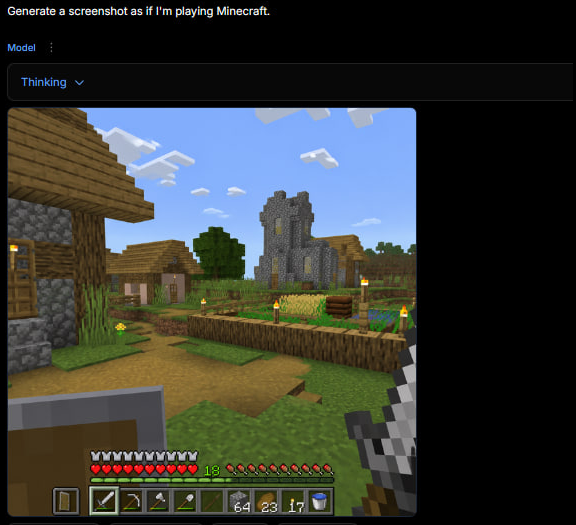
A dark web app screenshot showing a generated first-person Minecraft village gameplay scene with HUD, useful for recreating the tweet-style AI game screenshot.
プロンプト
目標: ダークなAI画像生成ウェブインターフェースのスクエアスクリーンショットを作成する。生成されたMinecraftゲームプレイスクーンショットを表示する。インターフェースは、誰かが{argument name="user prompt" default="Minecraftをプレイしているかのようなスクーンショットを生成"}とタイプし、その下にレンダリングされたゲーム画像を受け取ったように見える。

キャンバス: スクエア1:1画像、約576 x 576ピクセル、ダークブラックの背景、コンテンツが左上近くに配置され、右と下に大きな空の黒いマージン。

トップUIレイアウト: 最も左上に、白いプロンプトテキスト: “Generate a screenshot as if I'm playing Minecraft.” を表示する。その下に、小さな青いラベル “Model” と縦の三点メニューアイコンを表示する。さらに下に、幅の広いダークな角丸の長方形ドロップダウンバーを描き、青いテキスト “Thinking” と小さな下向きチェvronを含む。UIはダークモードのミニマルなウェブアプリのように感じる。

生成画像パネル: ドロップダウンの下に、少し角丸の大きなスクエアMinecraftスタイルのゲームプレイスクーンショットを配置する。スクーンショットは、明るいブロック villageシーンの一人称視点である。

Minecraftシーンの詳細: 青い空と正確に8個の見える白いブロック雲クラスターを持つ晴れた昼間の村を表示する。左の前景に、部分的に見える木と cobblestoneの家、木のドア、 plank屋根、 cobblestoneの壁、および点灯したトーチを含む。中央の遠景に、狭い黄色い照明窓を持つ灰色の石の教会/塔を表示する。周囲に、小さな村の家、葉の茂った緑の木、草ブロック、土の道、および柵で囲まれた農地を含む。農地は、金色の小麦、緑の作物、木製の柵境界、および正確に6個の見える黄色い炎を持つトーチポストを村/農場エリア周辺に含む。Minecraft美学を正規に保つ: 立方体ブロック、ピクセル化されたテキスト、低解像度のゲームレンダリング、写真現実主義なし。

一人称視点HUDと装備: 左下の前景に、上げられたシールドを表示する。右下の前景に、鉄の剣を持つプレイヤーを表示する。下部に、正確に10個の赤いハート、正確に10個の満足ドラムスティック、緑の経験レベル数値 “18”、および9スロットのホットバーを描く。ホットバーは、左から右にこれらの9つの見えるスロットを含む: シールドアイコン、鉄の剣、つるはし、斧、シャベル、空またはダークスロット、64ブロックのスタック、23トーチ/アイテムのスタック、17アイテムのスタック、さらにスペースが許せば右端に水バケツアイコンを表示。HUDを少しピクセル化し、ゲームに正確にする。

ビジュアルスタイル: 画像全体は、クリーンなスタンドアロンレンダーではなく、生成されたMinecraftゲーム画像を表示するブラウザベースのAIジェネレーターの実際のスクリーンショットのように見えるべき。ダークUIクローム、小さな鮮明なテキスト、および組み込まれたブロックゲームスクーンショットを使用する。透かし、余分なキャプション、ロゴなし。
機械翻訳 — この作品を生成したのは元のプロンプトです。
元のプロンプト
Goal: Create a square screenshot of a dark AI image-generation web interface showing a generated Minecraft gameplay screenshot. The interface should look like someone typed {argument name="user prompt" default="Generate a screenshot as if I'm playing Minecraft."} and received a rendered game image below it.

Canvas: Square 1:1 image, approximately 576 by 576 pixels, dark black background, with the content aligned near the top-left and a large empty black margin on the right and bottom.

Top UI layout: At the very top-left, show the white prompt text: “Generate a screenshot as if I'm playing Minecraft.” Beneath it, show a small blue label “Model” with a vertical three-dot menu icon beside it. Below that, draw a wide dark rounded rectangle dropdown bar containing the blue text “Thinking” and a small downward chevron. The UI should feel like a minimal web app in dark mode.

Generated image panel: Under the dropdown, place a large square Minecraft-style gameplay screenshot with slightly rounded corners. The screenshot should be first-person perspective in a bright blocky village scene.

Minecraft scene details: Show a sunny daytime village with a blue sky and exactly 8 visible white blocky cloud clusters. On the left foreground, include a partially visible wooden-and-cobblestone house with a wooden door, plank roof, cobblestone wall, and a lit torch. In the center distance, show a gray stone church/tower with narrow yellow-lit windows. Around it, include a small village house, a leafy green tree, grass blocks, a dirt path, and a fenced crop field. The crop field should contain golden wheat, green crops, a wooden fence border, and exactly 6 visible torch posts with yellow flames around the village/farm area. Keep the Minecraft aesthetic authentic: cubic blocks, pixelated textures, low-resolution game rendering, no photorealism.

First-person HUD and equipment: In the lower left foreground, show a raised shield. In the lower right foreground, show the player holding an iron sword. Along the bottom, draw the Minecraft HUD with exactly 10 red hearts, exactly 10 hunger drumsticks, a green experience level number “18,” and a 9-slot hotbar. The hotbar should contain these 9 visible slots from left to right: shield icon, iron sword, pickaxe, axe, shovel, empty or dark slot, stack of 64 blocks, stack of 23 torches/items, stack of 17 items, plus a water bucket icon visible at the far right edge if space permits. Make the HUD slightly pixelated and game-accurate.

Visual style: The whole image should look like an actual screenshot of a browser-based AI generator displaying a generated Minecraft gameplay image, not a clean standalone render. Use dark UI chrome, small crisp text, and a blocky game screenshot embedded inside it. No watermark, no extra captions, no logos.