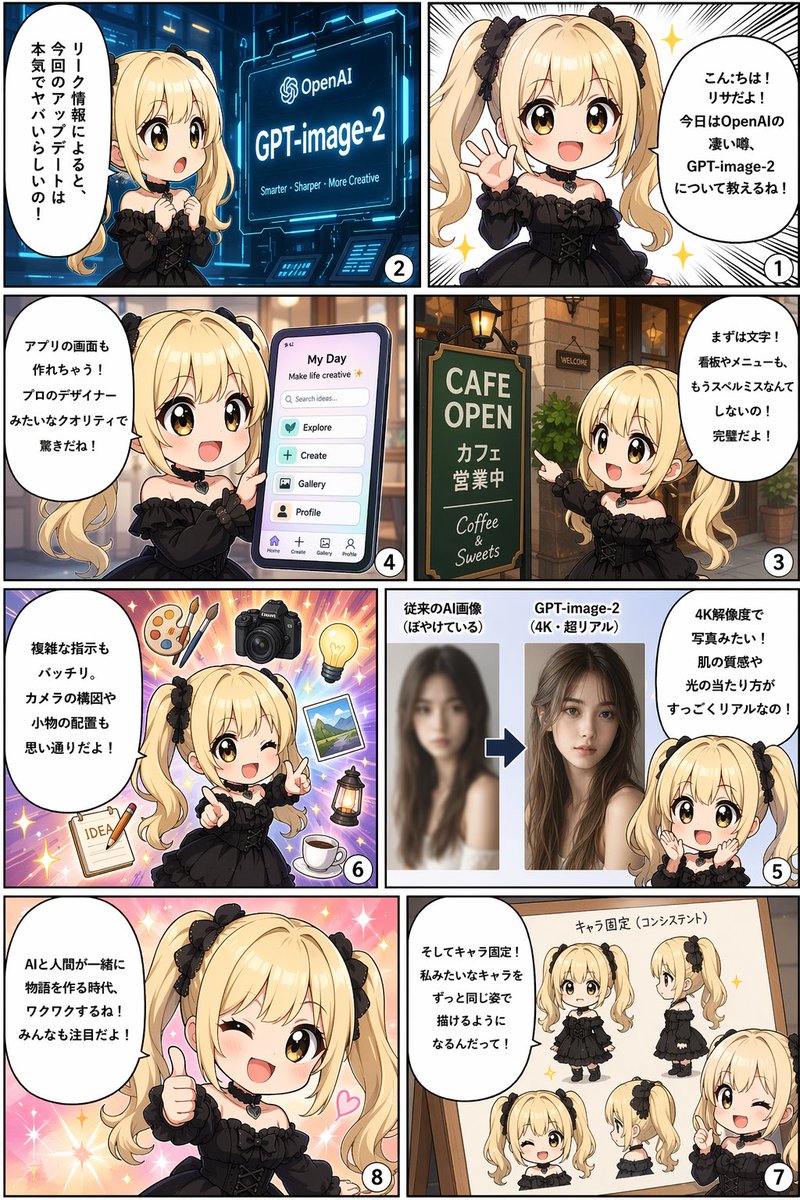
8-Panel AI Feature Explainer Manga
views12,900
likes138
comments1
shares19
bookmarks78
quotes2
Translated
{
  "type": "8-panel manga comic strip",
  "layout": "4 rows, 2 columns grid, reading right-to-left, top-to-bottom",
  "character": {
    "appearance": "{argument name=\"character appearance\" default=\"chibi anime girl, blonde twin tails, black bows, brown eyes, black gothic dress, heart choker\"}"
  },
  "panels": [
    {
      "number": 1,
      "position": "top right",
      "visual": "Character waving and smiling happily against a sparkling white background.",
      "speech_bubble": "{argument name=\"panel 1 text\" default=\"Hello! I'm Lisa! Today, I'm going to tell you about the amazing rumor of OpenAI, GPT-image-2!\"}"
    },
    {
      "number": 2,
      "position": "top left",
      "visual": "Character looking surprised at a futuristic blue holographic screen displaying the OpenAI logo and '{argument name=\"topic\" default=\"GPT-image-2\"}'.",
      "screen_subtext": "{argument name=\"panel 2 screen text\" default=\"Smarter - Sharper - More Creative\"}",
      "speech_bubble": "According to leak info, this update is seriously crazy!"
    },
    {
      "number": 3,
      "position": "row 2 right",
      "visual": "Character pointing at a green cafe sign outside a brick building.",
      "sign_text": ["CAFE OPEN", "Cafe is open", "Coffee & Sweets"],
      "speech_bubble": "First, text! Signboards and menus won't have spelling mistakes anymore! It's perfect!"
    },
    {
      "number": 4,
      "position": "row 2 left",
      "visual": "Character holding a large smartphone displaying a mobile app interface.",
      "ui_elements": {
        "header": ["My Day", "Make life creative"],
        "search_bar": "Search ideas...",
        "buttons_count": 4,
        "buttons_labels": ["Explore", "Create", "Gallery", "Profile"],
        "bottom_nav_icons_count": 4
      },
      "speech_bubble": "It can even make app screens! The pro-designer quality is surprising!"
    },
    {
      "number": 5,
      "position": "row 3 right",
      "visual": "Character looking amazed at a before-and-after image comparison graphic.",
      "graphic_elements": {
        "left_image": "Blurry photo of a woman",
        "left_label": "Conventional AI image (blurry)",
        "right_image": "Sharp, realistic 4K photo of the same woman",
        "right_label": "{argument name=\"topic\" default=\"GPT-image-2\"} (4K super real)",
        "separator": "Blue arrow pointing right"
      },
      "speech_bubble": "It's like a photo in 4K resolution! Skin texture and lighting are super realistic!"
    },
    {
      "number": 6,
      "position": "row 3 left",
      "visual": "Character winking and pointing, surrounded by floating objects on a purple starburst background.",
      "floating_objects_count": 7,
      "floating_objects_labels": ["wooden palette with 2 brushes", "DSLR camera", "glowing lightbulb", "landscape photograph", "vintage lantern", "cup of coffee on saucer", "notepad with pencil and the word IDEA"],
      "speech_bubble": "Complex instructions are perfect too. Camera composition and prop placement are exactly as you want!"
    },
    {
      "number": 7,
      "position": "row 4 right",
      "visual": "Character pointing at a wooden whiteboard displaying a character reference sheet of herself.",
      "whiteboard_title": "Character consistency",
      "character_views_count": 5,
      "character_views_labels": ["front full-body", "side full-body", "front face winking", "side face", "half-body pointing"],
      "speech_bubble": "And character consistency! You'll be able to draw characters like me in the exact same appearance!"
    },
    {
      "number": 8,
      "position": "row 4 left",
      "visual": "Character giving a thumbs up, winking, and smiling broadly against a sparkling pink background.",
      "speech_bubble": "{argument name=\"panel 8 text\" default=\"The era when AI and humans create stories together is exciting, isn't it! Everyone should pay attention!\"}"
    }
  ]
}
Machine-translated — the original is what produced this result.


