Forest Cycling Rest Scene
views191
likes11
comments0
shares1
bookmarks0
quotes0
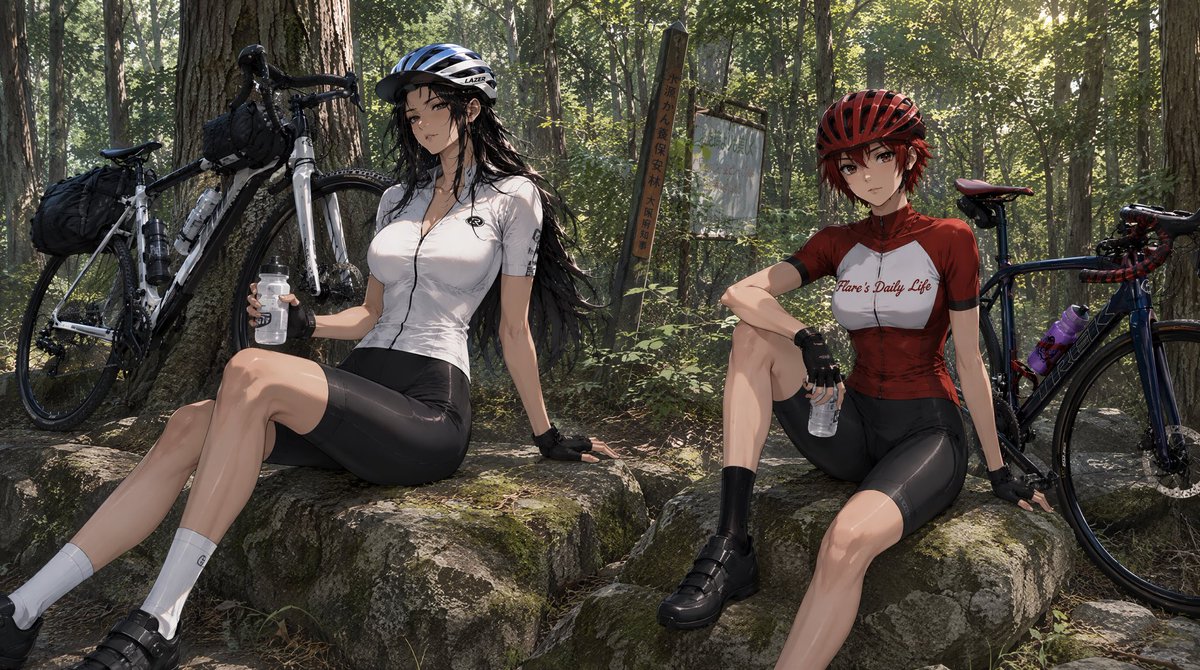
Using REFERENCE_0 as the character base, turn the character sheet into a cinematic anime storyboarding scene set during a cycling rest stop. Keep the red-haired cyclist’s identity, red helmet, red-and-white cycling jersey, black shorts, gloves, socks, and shoes consistent with the reference, but place her in a relaxed seated pose on a mossy boulder, holding a clear water bottle and leaning back with one hand.

Scene: Create a wide 16:9 horizontal composition in a sun-dappled forest trail rest area, with tall trees, dense green foliage, natural rocks, and realistic shafts of afternoon light. Add weathered trail signage in the background, including exactly 2 signs: one vertical wooden signpost and one faded rectangular signboard.

Additional character: Add exactly 1 new companion cyclist beside her: a tall, long black-haired woman wearing a blue-and-white helmet, white cycling jersey, black cycling shorts, fingerless gloves, white socks, and black cycling shoes. She should sit on a neighboring rock, relaxed, also holding a clear water bottle.

Props and layout: Include exactly 2 road bicycles leaning nearby: one white touring-style bike on the left against a tree with visible handlebar bags and frame bottles, and one dark blue/black bike on the right behind the red-haired character with a purple bottle on the frame. The two cyclists should feel like they have paused mid-ride to rest and hydrate.

Style: High-detail anime illustration with semi-realistic lighting, cinematic depth, natural forest textures, and a calm travel-video storyboard mood. Avoid the multi-panel character sheet layout, avoid UI labels, and do not add extra characters.

Customizable subject: portray this as a forest cycling break for {argument name="character name" default="Flare Scarlet"} at {argument name="location" default="a wooded mountain trail rest area"}, with the companion’s jersey color as {argument name="companion jersey color" default="white"} and the overall mood as {argument name="mood" default="peaceful after-ride rest"}.


