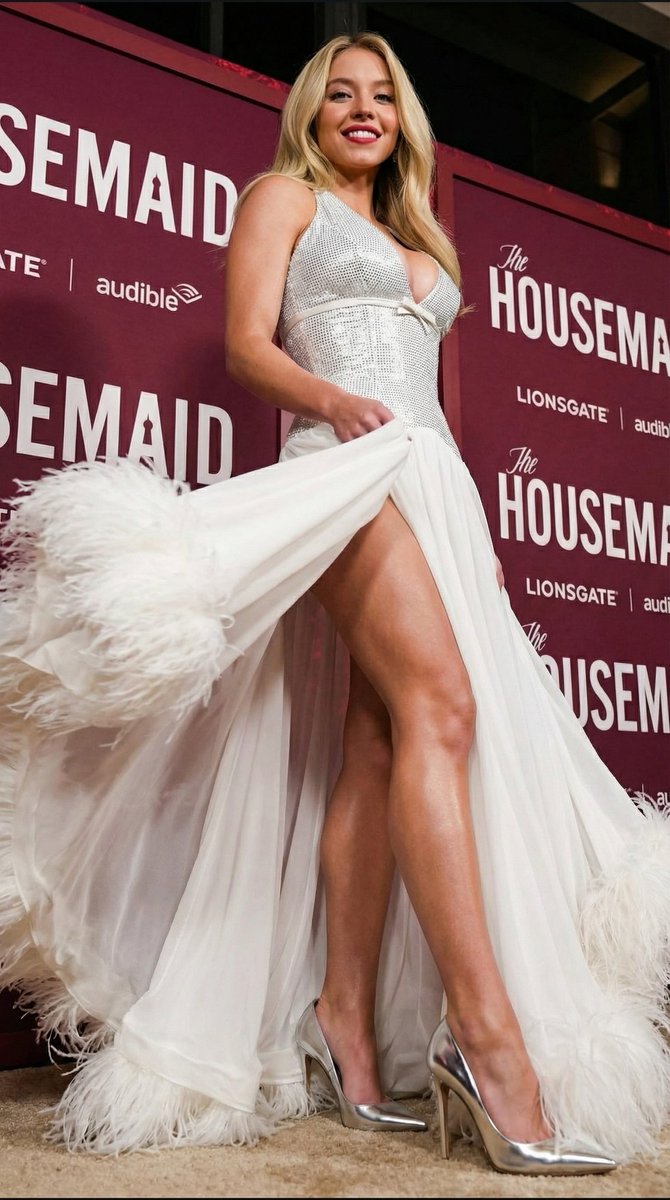
Sydney Sweeney Red Carpet Low-Angle Portrait Prompt
views389,200
likes3,400
comments37
shares175
bookmarks2,300
quotes4
{
  "prompt_type": "text-to-image",
  "subject": {
    "identity": "Sydney Sweeney, 100% exact likeness and face from reference photos",
    "appearance": "Long wavy blonde hair worn loose and flowing over shoulders, fair glowing skin, confident expression with subtle smile",
    "accessories": "Dainty bracelet on right wrist, minimal earrings"
  },
  "attire": {
    "upper_body": "Sparkling white sequined halter bodice with extreme deep plunging V-neckline and small decorative bow detail just under the bust",
    "lower_body": "Long, dramatic flowing white skirt/train with luxurious white feather trim at the hem, held slightly open/displayed by the subject's hand",
    "legwear": "Bare toned legs",
    "footwear": "Elegant pointed-toe stiletto pumps in white or metallic silver"
  },
  "composition": {
    "camera_angle": "Extreme low angle (worm's-eye view), looking up at the subject from near floor level",
    "perspective": "Dramatic foreshortening that emphasizes the subject's height, long legs, and towering presence",
    "framing": "Full body shot strongly dominated by foreground legs, shoes, and flowing feathered skirt"
  },
  "environment": {
    "location": "Red carpet premiere event",
    "background": "Large repeated dimensional signage of 'The HOUSEMAID' in white serif font on deep maroon backdrop with Lionsgate and Audible logos",
    "surface": "Classic red carpet floor"
  },
  "style": {
    "medium": "Digital photography, celebrity red carpet portrait",
    "lighting": "Professional event flash and ambient lighting, glossy highlights on sequins, feathers, skin, and shoes, high contrast with dramatic shadows",
    "quality": "High resolution, 8k, photorealistic, ultra-sharp focus on fabric sparkle, feather details, and facial features"
  }
}


