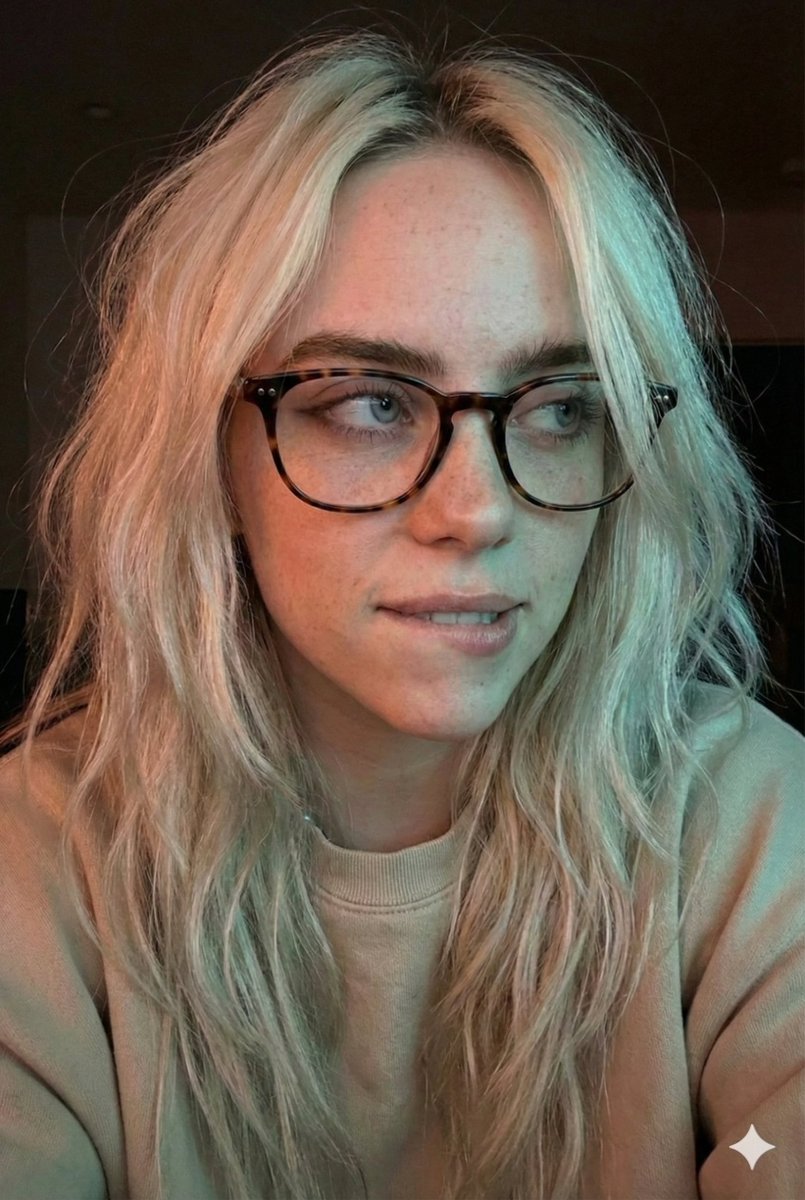
Moody Dual-Tone Selfie Portrait
views18,000
likes564
comments70
shares100
bookmarks302
quotes0
{
  "prompt_description": {
    "subject": {
      "type": "Young woman",
      "pose": "Close-up selfie portrait, head slightly tilted, looking off-camera to the right",
      "expression": "Subtle smirk, relaxed and confident demeanor, lips slightly pursed"
    },
    "facial_features": {
      "skin_tone": "Fair complexion with soft natural texture",
      "eyes": "Looking sideways, sharp focus, visible eyeliner",
      "makeup": "Natural look, minimal visible makeup aside from eyes"
    },
    "hair": {
      "style": "Long, loose waves, voluminous and slightly messy",
      "color": "Dirty blonde to light brown with natural highlights (balayage)",
      "texture": "Soft, detailed strands framing the face"
    },
    "accessories": {
      "eyewear": "{argument name="glasses frame" default="Tortoise shell pattern"} eyeglasses, cat-eye or rounded frame shape, reflective lenses catching the light"
    },
    "clothing": {
      "top": "Light beige or off-white casual sweatshirt or sweater, visible only at the shoulders"
    },
    "lighting_and_atmosphere": {
      "style": "Cinematic dual-tone lighting (split lighting)",
      "colors": "Warm reddish-orange glow on the left side, cool cyan/teal highlight on the top and right side",
      "mood": "Moody, intimate, low-light, atmospheric",
      "shadows": "Soft, diffused shadows creating depth"
    },
    "technical_specifications": {
      "quality": "4K Ultra HD, photorealistic, highly detailed",
      "style": "Portrait photography, candid selfie style",
      "focus": "Sharp focus on eyes and glasses, slight depth of field blurring the background",
      "texture_detail": "High fidelity skin texture and hair strands"
    }
  }
}


