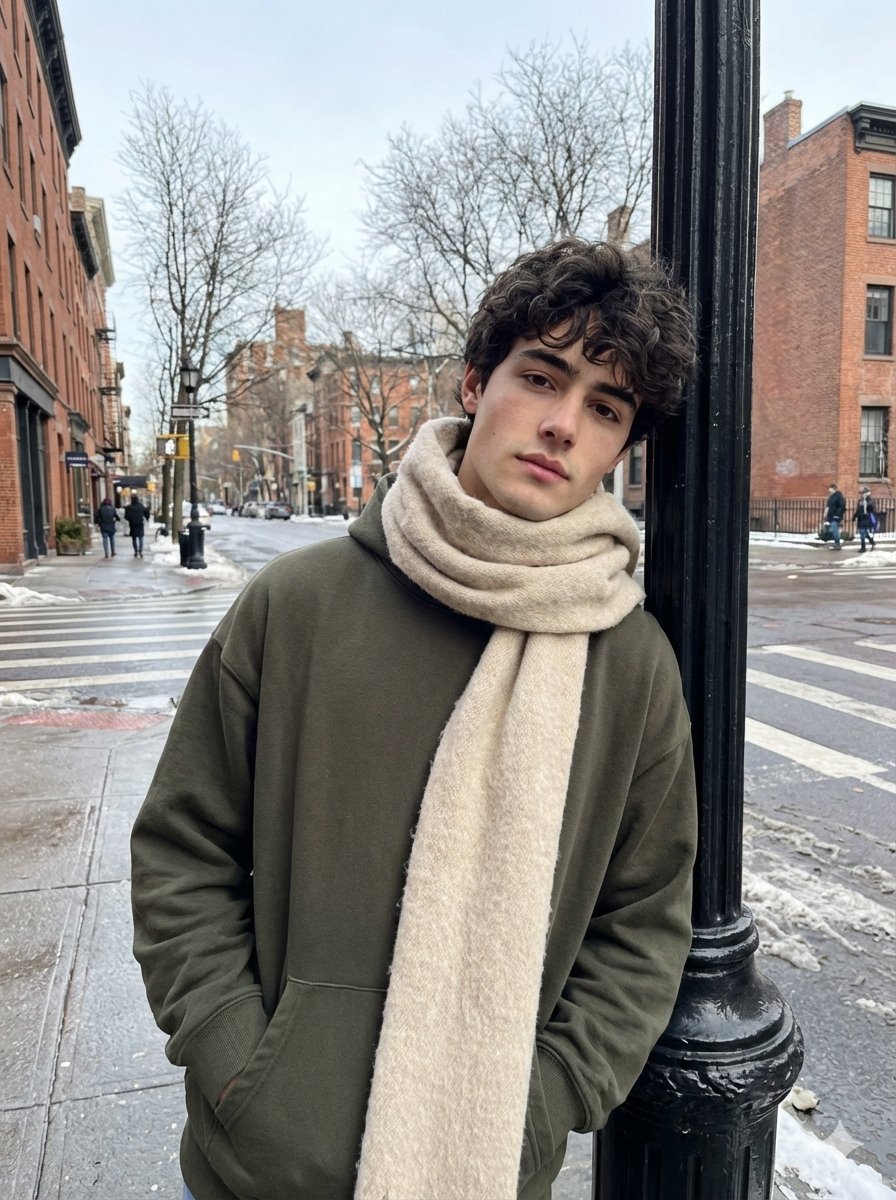
Ultra-Realistic Street Photo with Specific Subject Preservation
views4,500
likes129
comments18
shares11
bookmarks69
quotes1
Generate a realistic street photo of a guy on your iPhone in the casual street photography style. Use the face from the uploaded photo as the only and precise appearance standard: preserve facial features, face and body proportions, age, hair color and length at a 1:1 ratio, without even 1% change. The guy is standing on a city street in winter, leaning his shoulder slightly against a black street lamp on the sidewalk. His pose is relaxed, one hand in his pocket, the other hanging loosely. In the background are an intersection, bare winter trees, tall buildings, and a few people in the distance; the asphalt is wet after snow, creating a cool city atmosphere. Clothing: an oversized dark olive hoodie without a hood, a voluminous beige-cream scarf partially covers his head and hangs down slightly; the fabric is wool, the fibers are visible. Light: natural winter daylight, soft shadows, cool white balance, no flash. Realism: ultra-realistic photo, natural skin texture, pores, subtle imperfections, realistic fabric textures (scarf wool, thick cotton hoodie), no neural network effects. Quality: photo from the iPhone's main camera, RAW iPhone look, slight digital noise, natural sharpness. Aspect ratio 3:4.


