日本 AI 員工信息圖
Creates a vertical Japanese business infographic explaining how assigning roles to AI turns it into an AI employee for work automation concepts.
Prompt
目標:建立一個清晰的日本商業資訊圖表幻燈片,解釋轉向為 AI 分配角色,以「AI 員工」概念為中心。使用 {argument name="main headline" default="AIに役割を持たせる時代へ。"} 作為大型頂部標題。

畫布:垂直肖像資訊圖表,約 3:4 長寬比,白色背景,細淺灰色邊框,海軍藍強調色,黑色正文,圓角矩形內容區塊,極簡線條圖標。設計應看起來像精美的 LinkedIn/X 商業幻燈片或提案講義。

版面配置:使用 6 個從上到下的堆疊區塊。

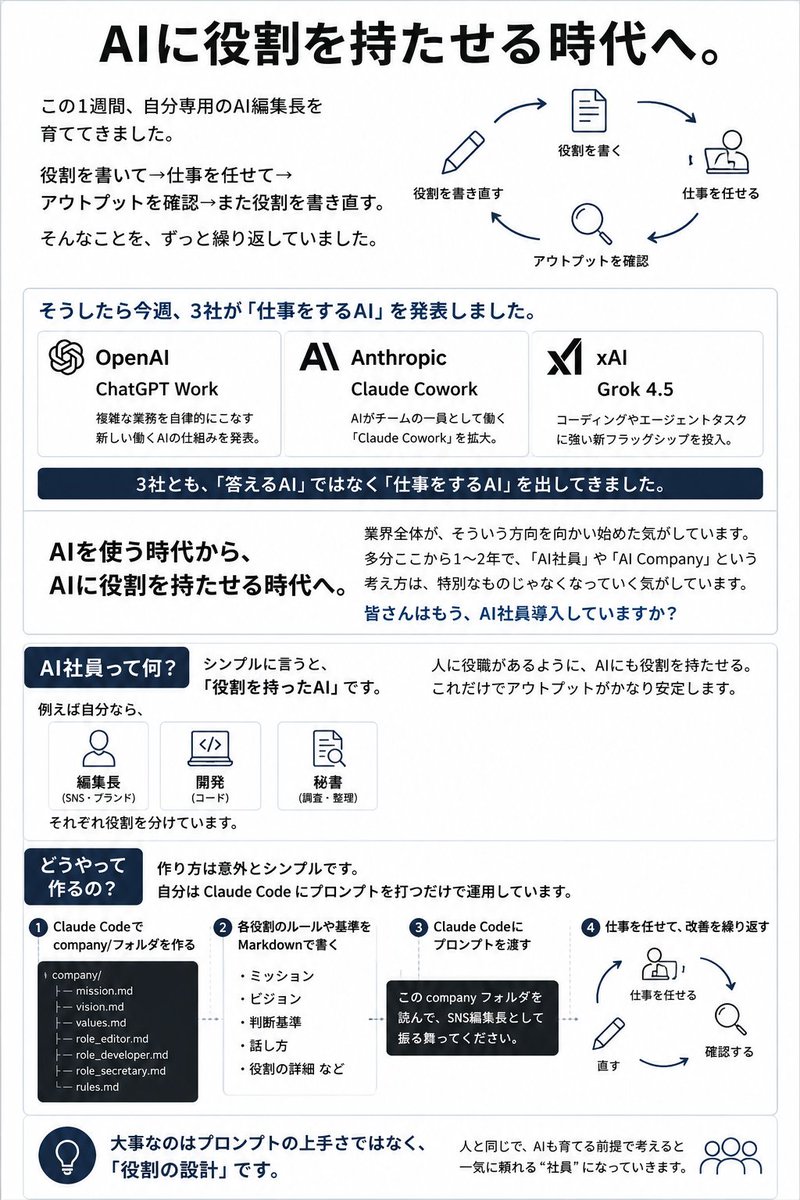
區塊 1 — 標題和循環圖表:頂部放置大型粗體標題。左側包含三行簡短的日文說明,關於花一週開發個人 AI 主編,反覆撰寫角色、分配工作、檢查輸出並重寫角色。右側顯示一個圓形 4 步工作流程,帶海軍藍箭頭和簡單圖標。 exactly 4 個工作流程步驟:1) 鉛筆圖標標記「役割を書き直す」,2) 文件圖標標記「役割を書く」,3) 桌邊人物圖標標記「仕事を任せる」,4) 放大鏡圖標標記「アウトプットを確認」。

區塊 2 — 三個公司公告卡片:一個圓角框,標題為 {argument name="announcement heading" default="そうしたら今週、3社が「仕事をするAI」を発表しました。"}。內部創建 exactly 3 個水平公司卡片。卡片 1:OpenAI 標誌狀結圖標,標題「OpenAI」,產品「ChatGPT Work」,簡短日文描述關於宣布新 AI 工作結構,自主處理複雜任務。卡片 2:Anthropic 風格化 AI 標誌,標題「Anthropic」,產品「Claude Cowork」,簡短日文描述關於擴展 Claude Cowork,AI 作為團隊成員工作。卡片 3:xAI 標誌,標題「xAI」,產品 {argument name="xAI product name" default="Grok 4.5"},簡短日文描述關於推出新旗艦,在編碼和代理任務中強大。卡片下方放置一個深海軍藍橫幅,白色文字:「3社とも、「答えるAI」ではなく「仕事をするAI」を出してきました。」。

區塊 3 — 關鍵訊息區塊:分為兩欄。左欄有大型粗體文字:「AIを使う時代から、AIに役割を持たせる時代へ。」右欄有一段落解釋整個產業正朝這個方向移動,ChatGPT Work、AI 員工和 AI 公司不再異常。以粗體海軍藍問題結尾:{argument name="closing question" default="皆さんはもう、AI社員導入していますか?"}。

區塊 4 — AI 員工定義:以海軍藍膠囊標題開始:「AI社員って何?」。用日文解釋,簡單來說,是具有角色的 AI。 exactly 3 個小型角色卡片在「例えば自分なら、」下:1) 人物圖標標記「編集長(SNS・ブランド)」,2) 筆記型電腦/代碼圖標標記「開発(コード)」,3) 文件/搜尋圖標標記「秘書(調査・整理)」。添加註釋每個都有分開的角色。右側寫著,通過像人一樣給 AI 角色,輸出變得更穩定。

區塊 5 — 如何製作:添加海軍藍膠囊標題「どうやって作るの?」並解釋方法驚人簡單:創建 Claude Code 公司提示並運作它。顯示 exactly 4 個編號步驟的水平流程。步驟 1:「Claude Codeで company/フォルダを作る」帶深色終端風格檔案樹, exactly 7 個檔案:company/, mission.md, vision.md, values.md, role_editor.md, role_developer.md, role_secretary.md, rules.md。步驟 2:「各役割のルールや基準を Markdownで書く」帶項目符號:「ミッション」、「ビジョン」、「判断基準」、「話し方」、「役割の詳細など」。步驟 3:「Claude Codeにプロンプトを渡す」帶黑色對話氣泡,包含日文文字要求它讀取公司資料夾並擔任 SNS 主編。步驟 4:「仕事を任せて、改善を繰り返す」帶小型圓形循環,顯示桌邊人物、放大鏡和鉛筆圖標標記工作、檢查、修正。

區塊 6 — 底部要點:一個圓角頁尾條,左側有海軍藍燈泡圖標和粗體日文要點文字:{argument name="footer takeaway" default="大事なのはプロンプトの上手さではなく、「役割の設計」です。"}。右側添加一個小型人物/團隊圖標和一句話,解釋如果你假設 AI 是像人一樣訓練的東西,它就成為你可以依賴的員工。

視覺風格:日本企業資訊圖表,清晰排版,慷慨間距,微妙灰色分隔線,海軍藍高光,平面單色線條圖標,無照片,無漸層,無雜亂。保持所有日文文字清晰對齊。不要添加額外公司、額外步驟、額外卡片,或超出指定計數的裝飾元素。
機器翻譯 — 實際產出作品的是原文 prompt。
原文 Prompt
Goal: Create a clean Japanese business infographic slide explaining the shift to assigning roles to AI, centered on the concept of an “AI employee.” Use {argument name="main headline" default="AIに役割を持たせる時代へ。"} as the large top headline.

Canvas: Vertical portrait infographic, approximately 3:4 aspect ratio, white background, thin light-gray border, navy blue accent color, black body text, rounded rectangular content blocks, minimalist line icons. The design should look like a polished LinkedIn/X business slide or proposal handout.

Layout: Use 6 stacked sections from top to bottom.

Section 1 — Header and cycle diagram: At the top, place the large bold headline. On the left, include three short Japanese explanatory lines about spending one week developing a personal AI editor-in-chief, repeatedly writing roles, assigning work, checking output, and rewriting roles. On the right, show a circular 4-step workflow with navy arrows and simple icons. Count exactly 4 workflow steps: 1) pencil icon labeled 「役割を書き直す」, 2) document icon labeled 「役割を書く」, 3) person-at-desk icon labeled 「仕事を任せる」, 4) magnifying glass icon labeled 「アウトプットを確認」.

Section 2 — Three company announcement cards: A rounded box with the heading {argument name="announcement heading" default="そうしたら今週、3社が「仕事をするAI」を発表しました。"}. Inside it, create exactly 3 horizontal company cards. Card 1: OpenAI logo-like knot icon, title 「OpenAI」, product 「ChatGPT Work」, short Japanese description about announcing a new AI work structure that autonomously handles complex tasks. Card 2: Anthropic stylized AI logo, title 「Anthropic」, product 「Claude Cowork」, short Japanese description about expanding Claude Cowork, where AI works as a member of the team. Card 3: xAI logo, title 「xAI」, product {argument name="xAI product name" default="Grok 4.5"}, short Japanese description about launching a new flagship strong in coding and agent tasks. Below the cards, place a dark navy banner with white text: 「3社とも、「答えるAI」ではなく「仕事をするAI」を出してきました。」.

Section 3 — Key message block: Split into two columns. Left column has large bold text: 「AIを使う時代から、AIに役割を持たせる時代へ。」 Right column has a paragraph explaining that the whole industry is moving in this direction, and that ChatGPT Work, AI employees, and AI Company are no longer unusual concepts. End with a bold navy question: {argument name="closing question" default="皆さんはもう、AI社員導入していますか?"}.

Section 4 — Definition of AI employee: Start with a navy pill heading: 「AI社員って何?」. Explain in Japanese that, simply put, it is an AI with a role. Include exactly 3 small role cards under 「例えば自分なら、」: 1) person icon labeled 「編集長(SNS・ブランド)」, 2) laptop/code icon labeled 「開発(コード)」, 3) document/search icon labeled 「秘書(調査・整理)」. Add a note that each is given a separate role. On the right, write that by giving AI roles like people have job roles, output becomes more stable.

Section 5 — How to make it: Add a navy pill heading 「どうやって作るの?」 and explain that the method is surprisingly simple: create a Claude Code company prompt and operate it. Show exactly 4 numbered steps in a horizontal process. Step 1: 「Claude Codeで company/フォルダを作る」 with a dark terminal-style file tree showing exactly 7 files: company/, mission.md, vision.md, values.md, role_editor.md, role_developer.md, role_secretary.md, rules.md. Step 2: 「各役割のルールや基準を Markdownで書く」 with bullets: 「ミッション」, 「ビジョン」, 「判断基準」, 「話し方」, 「役割の詳細など」. Step 3: 「Claude Codeにプロンプトを渡す」 with a black speech bubble containing Japanese text asking it to read the company folder and act as the SNS editor-in-chief. Step 4: 「仕事を任せて、改善を繰り返す」 with a mini circular loop showing person-at-desk, magnifying glass, and pencil icons labeled work, check, fix.

Section 6 — Bottom takeaway: A rounded footer strip with a navy lightbulb icon on the left and bold Japanese takeaway text: {argument name="footer takeaway" default="大事なのはプロンプトの上手さではなく、「役割の設計」です。"}. On the right, add a small people/team icon and a sentence explaining that if you assume AI is something to train like a human, it becomes an employee you can rely on.

Visual style: Japanese corporate infographic, crisp typography, generous spacing, subtle gray dividers, navy highlights, flat monochrome line icons, no photos, no gradients, no clutter. Keep all Japanese text legible and aligned. Do not add extra companies, extra steps, extra cards, or decorative elements beyond the specified counts.