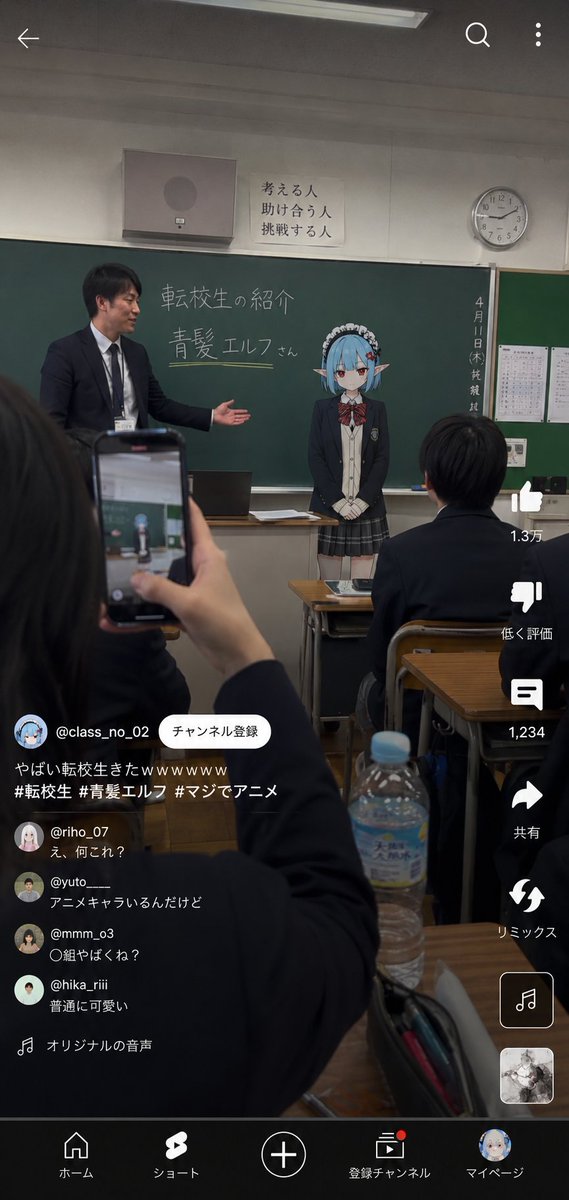
Anime Character Transfer to Reality
views12,400
likes110
comments4
shares13
bookmarks49
quotes4
Translated
Use the reference image as the base for character design, and depict "{argument name="シチュエーション" default="転生したアニメキャラクターが、現実世界の学校へ転校してきた瞬間"}". Accurately maintain the atmosphere of the character as an anime illustration. Absolutely do not compromise the character's identity. Do not make it live-action humanization. Keep the character part in anime illustration expression. The character is wearing a realistic Japanese high school uniform. The uniform should be designs that naturally exist in a real high school, such as blazers, ties, ribbons, cardigans, shirts, school-specified skirts, etc. The setting is a realistic Japanese high school classroom. Naturally arrange blackboard, teacher's desk, fluorescent lights, printouts, curtains, desks, chairs, school bulletin items, lockers, and lived-in classroom facilities. The background should not be too clean. Emphasize lived-in feel, the cluttered atmosphere unique to school, and realism. Vertical smartphone video-style composition. Add short video-style UI like TikTok, YouTube Shorts, or Instagram Reels, as if students secretly filmed and posted it. In the foreground, naturally frame a student's hand holding a smartphone, desk, notebook, pencil case, half-finished pet bottle, etc. At the front of the classroom, a live-action-level teacher is introducing the uniformed anime character transfer student to the class. On the blackboard, the transfer student's name {argument name="名前" default="青髪エルフ"} is written in chalk. The character has a natural atmosphere of "just transferred normally", such as being slightly tense, expressionless, introducing themselves normally, giving a slight bow to the classroom, trying to naturally fit into the real world, etc. Important: The character themselves is not particularly aware of being an anime character. The surrounding students are also not completely surprised, maintaining a temperature of "somehow transferred normally". Naturally generate realistic reactions in the short video comment section, buzzing with half-doubt. Lighting should be naturally unified. Match the ambient light of background and character with classroom fluorescent lights, daylight from windows, overcast natural light, monitor light, etc. Add smartphone photography-like texture. Add light HDR processing, fine sensor noise, slight JPEG compression feel, natural exposure, slight chromatic aberration, light lens bloom, autofocus feel, slight camera shake, high ISO noise, and handheld shooting-like instability. Do not make it movie poster-style. No excessive cinematic effects. No overly clean composition. Avoid AI-specific glossy rendering. Emphasize not a perfect work, but the accidental feel of "a mysterious transfer student short video secretly posted by a student".
Machine-translated — the original is what produced this result.


