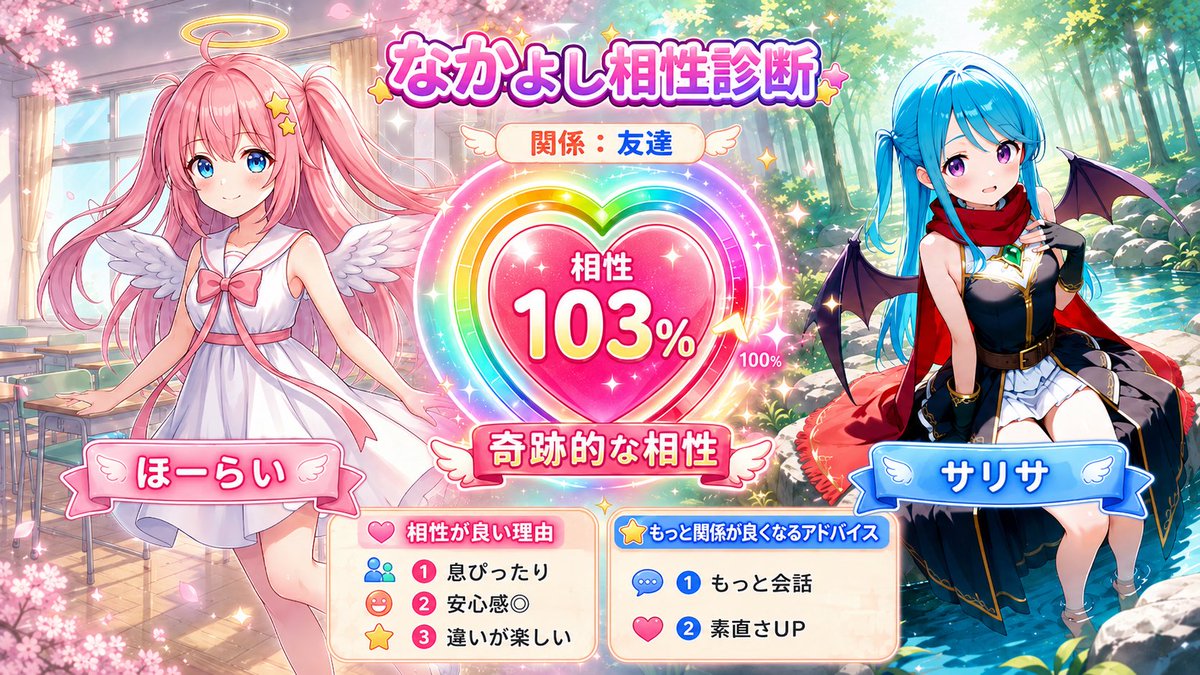
Character Compatibility Result UI Generator
views1,200
likes12
comments1
shares3
bookmarks6
quotes1
Translated
Refer to the two attached character images and generate a 16:9 horizontal illustration with the theme of "character compatibility diagnosis" for two people. Do not return the diagnosis results or prompt in text, but definitely draw it as one complete illustration. [Input fields] Character A's name: {argument name="Character A's name" default="Character A"} Character B's name: {argument name="Character B's name" default="Character B"} Relationship between the two: {argument name="Relationship between the two" default="Best friends"} Free notes: * Optional. Personality and usual relationship, etc. If not entered, judge from the expressions, clothing, colors, and atmosphere of the attached images. [Content] 16:9 game-style UI illustration. Place the two on the left and right, and place a large compatibility gauge / heart-shaped meter / affinity result-style UI in the center. Reproduce the hairstyles, hair colors, eyes, clothing, accessories, and atmospheres of Character A and B faithfully to the attached images without mixing them. The art style, color usage, background, and UI design should match the atmosphere of the two attached images. [Compatibility diagnosis] Automatically diagnose compatibility from 0 to 120% based on relationship, free notes, and personalities felt from the images, and display it within the image. Over 100% is expressed as "limit break", "miraculous compatibility", "destined compatibility", with gauge breakthrough, rainbow aura, LIMIT BREAK-style effects. For good relationships, do not set the value too low. Guidelines: Best friends 85~120%, Friends 70~105%, Partners 80~115%, Childhood friends 75~110%, Seniors and Juniors 55~100%, Rivals 45~105%, Poor relationship 25~85%, Less than lovers 70~115%. Important: Do not fix the compatibility percentage every time. Even for the same relationship, do not use the same number, but let it vary naturally according to the character's atmosphere. Especially for best friends, do not always use 112%. [Text within the image] Text should be short and easy to read. Long text is prohibited. Must include: A's name, B's name, relationship, compatibility XX%, short diagnosis title. If possible, include: 3 reasons for good compatibility, 2 advice for better relationship. Reasons and advice should be displayed with short UI labels or mini-panels with icons, such as "In sync", "Sense of security ◎", "Vibe matches", "More conversation", "Honesty UP", etc. [Composition] Characters should not touch each other. Do not hold hands, link arms, embrace, get close, or overlap bodies. Place the central UI between the two, leaving an appropriate distance. Good relationship is expressed not through contact, but through expressions, gazes, poses, body directions, background icons, and UI effects. [Finishing] A highly complete illustration for SNS that is bright and easy to see. Make the presence of both characters equal. [Avoid] Mixing of faces and hairstyles, clothing swaps, eye color changes, addition of people, disappearance of one, contact, holding hands, getting close, body overlap, breakdown of hands, feet, or fingers, increase of arms, long text, garbled characters, unreadable text, cluttered UI, excessive background, low resolution, blurring, distortion, turning into different characters.
Machine-translated — the original is what produced this result.


