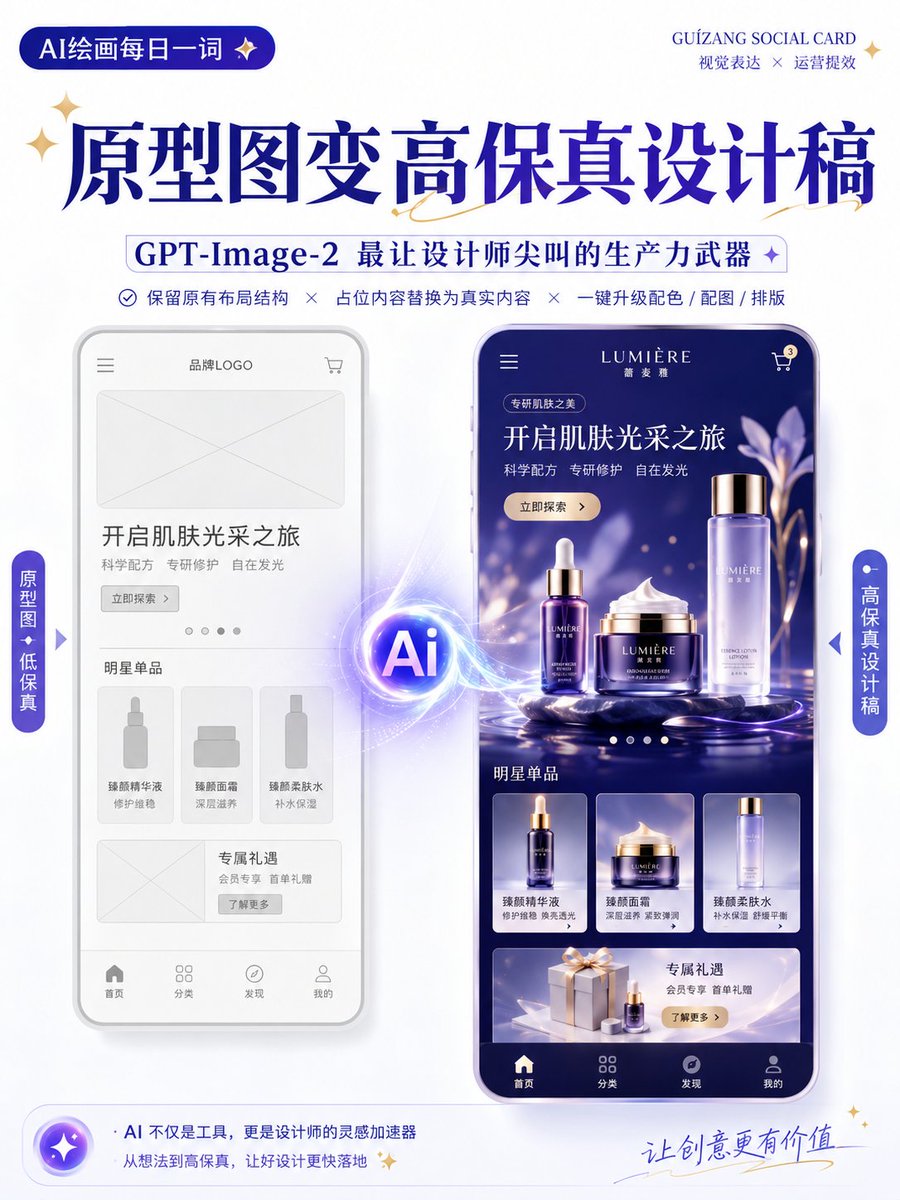
Wireframe to High-Fidelity UI Design
views3,100
likes40
comments1
shares8
bookmarks41
quotes0
Translated
Using the uploaded wireframe / prototype as reference, generate a high-fidelity design draft.

Design type: 【{argument name="design type" default="operational activity page / App interface / H5 page / e-commerce detail page / official website page / infographic"}】

Requirements:
1. Preserve the original page layout structure, information hierarchy, and module division
2. Replace placeholders in the wireframe with real content
3. Automatically supplement color schemes, images, icons, and layout details
4. Enhance the page's visual hierarchy, whitespace, alignment, and module relationships
5. Output as a high-completion, high-fidelity design draft

Visual style: 【{argument name="visual style" default="minimalist modern / tech feel / light skeuomorphism / fresh / brand feel / premium feel"}】
Primary color: 【{argument name="primary color" default="blue"}】
Secondary color: 【fill in color】
Aspect ratio: 【such as 9:16 / 4:3 / 16:9】

Note:
Preserve the original structure, do not arbitrarily disrupt the module order.
Focus on optimizing visual performance and real content presentation, making it look like a complete design draft suitable for proposal presentation.

Keep the original information architecture of the wireframe unchanged, only enhance visual completion and realism.
Machine-translated — the original is what produced this result.


